# TavernAI - Extras
## What is this
A set of unofficial APIs for various TavernAI extensions.
**You need to run the lastest version of my TavernAI mod. Grab it here: [Direct link to ZIP](https://github.com/SillyLossy/TavernAI/archive/refs/heads/main.zip), [Git repository](https://github.com/SillyLossy/TavernAI)**
All modules require at least 6 Gb of VRAM to run. With Stable Diffusion disabled, it will probably fit in 4 Gb.
Alternatively, everything could also be run on the CPU.
Try on Colab (runs KoboldAI backend and TavernAI Extras server alongside):
 ## How to run
### :exclamation: **IMPORTANT!**
> Default **requirements.txt** contains only basic packages for text processing
> If you want to use the most advanced features (like Stable Diffusion, TTS), change that to **requirements-complete.txt** in commands below. See [Modules](#modules) section for more details.
> You must specify a list of module names to be run in the `--enable-modules` command (`caption` provided as an example). See [Modules](#modules) section.
### ☁️ Colab
* Open colab link
* Select desired "extra" options and start the cell
* Wait for it to finish
* Get an API URL link from colab output under the `### TavernAI Extensions LINK ###` title
* Start TavernAI with extensions support: set `enableExtensions` to `true` in [config.conf](https://github.com/SillyLossy/TavernAI/blob/dev/config.conf)
* Navigate to TavernAI settings and put in an API URL and tap "Connect" to load the extensions
### 💻 Locally
#### Option 1 - Conda (recommended) 🐍
* Install Miniconda: https://docs.conda.io/en/latest/miniconda.html
* Install git: https://git-scm.com/downloads
* Before the first run, create an environment (let's call it `extras`):
```
conda create -n extras
conda activate extras
conda install pytorch torchvision torchaudio pytorch-cuda=11.7 git -c pytorch -c nvidia
git clone https://github.com/SillyLossy/TavernAI-extras
cd TavernAI-extras
pip install -r requirements.txt
```
* Run `python server.py --enable-modules=caption`
* Get the API URL. Defaults to `http://localhost:5100` if you run locally.
* Start TavernAI with extensions support: set `enableExtensions` to `true` in [config.conf](https://github.com/SillyLossy/TavernAI/blob/dev/config.conf)
* Navigate to TavernAI settings and put in an API URL and tap "Connect" to load the extensions
* To run again, simply activate the environment and run the script:
```
conda activate extras
python server.py
```
#### Option 2 - Vanilla 🍦
* Install Python 3.10: https://www.python.org/downloads/release/python-31010/
* Install git: https://git-scm.com/downloads
* Clone the repo:
```
git clone https://github.com/SillyLossy/TavernAI-extras
cd TavernAI-extras
```
* Run `pip install -r requirements.txt`
* Run `python server.py --enable-modules=caption`
* Get the API URL. Defaults to `http://localhost:5100` if you run locally.
* Start TavernAI with extensions support: set `enableExtensions` to `true` in [config.conf](https://github.com/SillyLossy/TavernAI/blob/dev/config.conf)
* Navigate to TavernAI settings and put in an API URL and tap "Connect" to load the extensions
### Settings menu ⚙️
## How to run
### :exclamation: **IMPORTANT!**
> Default **requirements.txt** contains only basic packages for text processing
> If you want to use the most advanced features (like Stable Diffusion, TTS), change that to **requirements-complete.txt** in commands below. See [Modules](#modules) section for more details.
> You must specify a list of module names to be run in the `--enable-modules` command (`caption` provided as an example). See [Modules](#modules) section.
### ☁️ Colab
* Open colab link
* Select desired "extra" options and start the cell
* Wait for it to finish
* Get an API URL link from colab output under the `### TavernAI Extensions LINK ###` title
* Start TavernAI with extensions support: set `enableExtensions` to `true` in [config.conf](https://github.com/SillyLossy/TavernAI/blob/dev/config.conf)
* Navigate to TavernAI settings and put in an API URL and tap "Connect" to load the extensions
### 💻 Locally
#### Option 1 - Conda (recommended) 🐍
* Install Miniconda: https://docs.conda.io/en/latest/miniconda.html
* Install git: https://git-scm.com/downloads
* Before the first run, create an environment (let's call it `extras`):
```
conda create -n extras
conda activate extras
conda install pytorch torchvision torchaudio pytorch-cuda=11.7 git -c pytorch -c nvidia
git clone https://github.com/SillyLossy/TavernAI-extras
cd TavernAI-extras
pip install -r requirements.txt
```
* Run `python server.py --enable-modules=caption`
* Get the API URL. Defaults to `http://localhost:5100` if you run locally.
* Start TavernAI with extensions support: set `enableExtensions` to `true` in [config.conf](https://github.com/SillyLossy/TavernAI/blob/dev/config.conf)
* Navigate to TavernAI settings and put in an API URL and tap "Connect" to load the extensions
* To run again, simply activate the environment and run the script:
```
conda activate extras
python server.py
```
#### Option 2 - Vanilla 🍦
* Install Python 3.10: https://www.python.org/downloads/release/python-31010/
* Install git: https://git-scm.com/downloads
* Clone the repo:
```
git clone https://github.com/SillyLossy/TavernAI-extras
cd TavernAI-extras
```
* Run `pip install -r requirements.txt`
* Run `python server.py --enable-modules=caption`
* Get the API URL. Defaults to `http://localhost:5100` if you run locally.
* Start TavernAI with extensions support: set `enableExtensions` to `true` in [config.conf](https://github.com/SillyLossy/TavernAI/blob/dev/config.conf)
* Navigate to TavernAI settings and put in an API URL and tap "Connect" to load the extensions
### Settings menu ⚙️
 ## UI Extensions 🚀
| Name | Description | Required [Modules](#modules) | Screenshot |
| ---------------- | ---------------------------------| ---------------------------- | ---------- |
| Image Captioning | Send a cute picture to your bot!
## UI Extensions 🚀
| Name | Description | Required [Modules](#modules) | Screenshot |
| ---------------- | ---------------------------------| ---------------------------- | ---------- |
| Image Captioning | Send a cute picture to your bot!
Picture select option will appear beside "Message send" button. | `caption` | 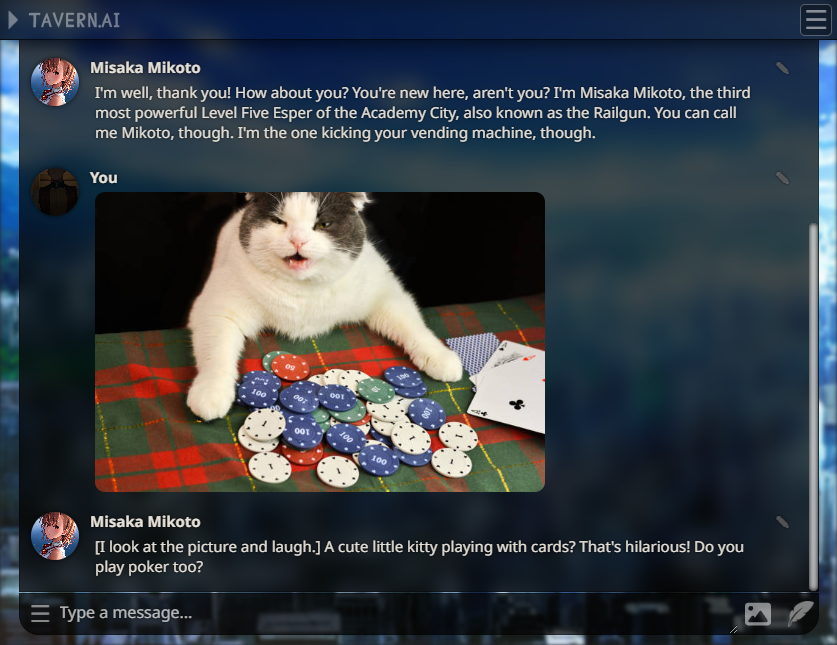 |
| Character Expressions | See your character reacting to your messages!
|
| Character Expressions | See your character reacting to your messages!
**You need to provide your own character images!**
1. Create a folder in TavernAI called `public/characters/`, where `` is a name of your character.
2. For base emotion classification model, put six PNG files there with the following names: `joy.png`, `anger.png`, `fear.png`, `love.png`, `sadness.png`, `surprise.png`. Other models may provide another options.
3. Images only display in desktop mode. | `classify` | 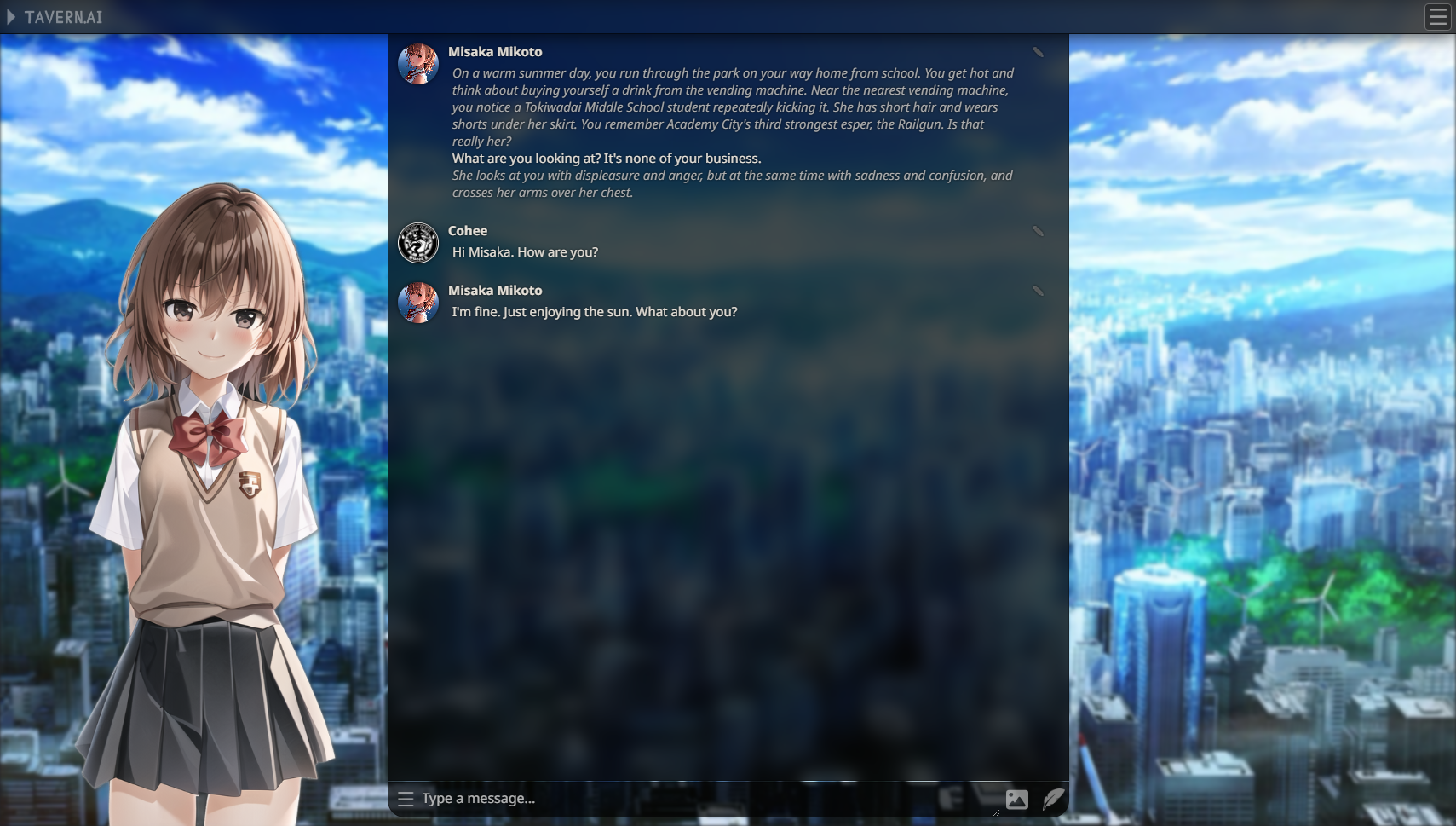 |
| Memory | Chatbot long-term memory simulation using automatic message context summarization. | `summarize` |
|
| Memory | Chatbot long-term memory simulation using automatic message context summarization. | `summarize` | 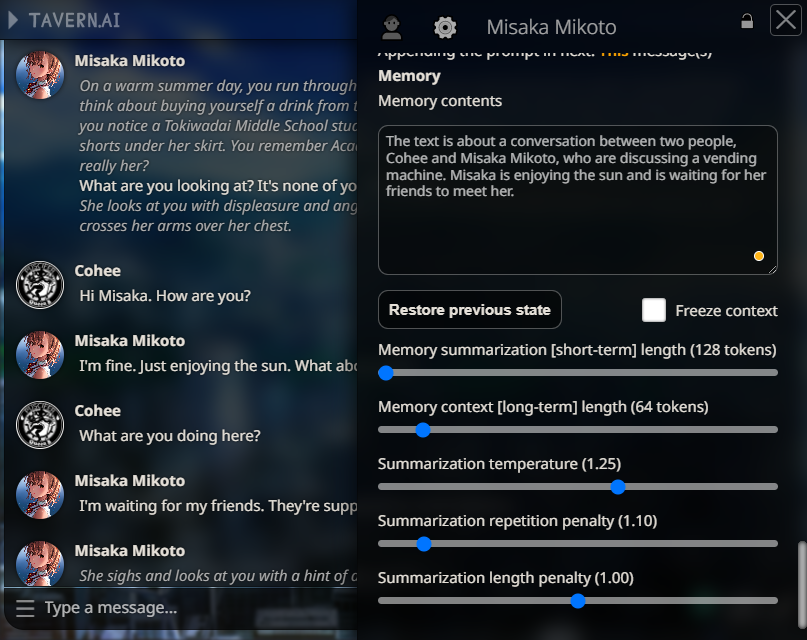 |
| Floating Prompt | Adds a string to your scenario after certain amount of messages you send. Usage ideas: reinforce certain events during roleplay. Thanks @Ali឵#2222 for suggesting me that! | None |
|
| Floating Prompt | Adds a string to your scenario after certain amount of messages you send. Usage ideas: reinforce certain events during roleplay. Thanks @Ali឵#2222 for suggesting me that! | None |  |
## Modules
| Name | Description | Included in default requirements.txt |
| ----------- | --------------------------------- | ------ |
| `caption` | Image captioning | ✔️ Yes |
| `summarize` | Text summarization | ✔️ Yes |
| `classify` | Text sentiment classification | ✔️ Yes |
| `keywords` | Text key phrases extraction | ✔️ Yes |
| `prompt` | SD prompt generation from text | ✔️ Yes |
| `sd` | Stable Diffusion image generation | :x: No |
## API Endpoints
### Get UI extensions list
`GET /api/extensions`
#### **Input**
None
#### **Output**
```
{"extensions":[{"metadata":{"css":"file.css","display_name":"human-friendly name","js":"file.js","requires":["module_id"]},"name":"extension_name"}]}
```
### Get UI extension JS script
`GET /api/script/`
#### **Input**
Extension name in a route
#### **Output**
File content
### Get UI extension CSS stylesheet
`GET /api/style/`
#### **Input**
Extension name in a route
#### **Output**
File content
### Get UI extension static asset
`GET /api/asset//`
#### **Input**
Extension name and assert name in a route
#### **Output**
File content
### Image captioning
`POST /api/caption`
#### **Input**
```
{ "image": "base64 encoded image" }
```
#### **Output**
```
{ "caption": "caption of the posted image" }
```
### Text summarization
`POST /api/summarize`
#### **Input**
```
{ "text": "text to be summarize", "params": {} }
```
#### **Output**
```
{ "summary": "summarized text" }
```
#### Optional: `params` object for control over summarization:
| Name | Default value |
| --------------------- | ------------------------------------------------------------- |
| `temperature` | 1.0 |
| `repetition_penalty` | 1.0 |
| `max_length` | 500 |
| `min_length` | 200 |
| `length_penalty` | 1.5 |
| `bad_words` | ["\n", '"', "*", "[", "]", "{", "}", ":", "(", ")", "<", ">"] |
### Text sentiment classification
`POST /api/classify`
#### **Input**
```
{ "text": "text to classify sentiment of" }
```
#### **Output**
```
{
"classification": [
{
"label": "joy",
"score": 1.0
},
{
"label": "anger",
"score": 0.7
},
{
"label": "love",
"score": 0.6
},
{
"label": "sadness",
"score": 0.5
},
{
"label": "fear",
"score": 0.4
},
{
"label": "surprise",
"score": 0.3
}
]
}
```
> **NOTES**
> 1. Sorted by descending score order
> 2. List of categories defined by the summarization model
> 3. Value range from 0.0 to 1.0
### Key phrase extraction
`POST /api/keywords`
#### **Input**
```
{ "text": "text to be scanned for key phrases" }
```
#### **Output**
```
{
"keywords": [
"array of",
"extracted",
"keywords",
]
}
```
### Stable Diffusion prompt generation
`POST /api/prompt`
#### **Input**
```
{ "name": "character name (optional)", "text": "textual summary of a character" }
```
#### **Output**
```
{ "prompts": [ "array of generated prompts" ] }
```
### Stable Diffusion image generation
`POST /api/image`
#### **Input**
```
{ "prompt": "prompt to be generated" }
```
#### **Output**
```
{ "image": "base64 encoded image" }
```
## Additional options
| Flag | Description |
| ------------------------ | ---------------------------------------------------------------------- |
| `--enable-modules` | **Required option**. Provide a list of enabled modules.
|
## Modules
| Name | Description | Included in default requirements.txt |
| ----------- | --------------------------------- | ------ |
| `caption` | Image captioning | ✔️ Yes |
| `summarize` | Text summarization | ✔️ Yes |
| `classify` | Text sentiment classification | ✔️ Yes |
| `keywords` | Text key phrases extraction | ✔️ Yes |
| `prompt` | SD prompt generation from text | ✔️ Yes |
| `sd` | Stable Diffusion image generation | :x: No |
## API Endpoints
### Get UI extensions list
`GET /api/extensions`
#### **Input**
None
#### **Output**
```
{"extensions":[{"metadata":{"css":"file.css","display_name":"human-friendly name","js":"file.js","requires":["module_id"]},"name":"extension_name"}]}
```
### Get UI extension JS script
`GET /api/script/`
#### **Input**
Extension name in a route
#### **Output**
File content
### Get UI extension CSS stylesheet
`GET /api/style/`
#### **Input**
Extension name in a route
#### **Output**
File content
### Get UI extension static asset
`GET /api/asset//`
#### **Input**
Extension name and assert name in a route
#### **Output**
File content
### Image captioning
`POST /api/caption`
#### **Input**
```
{ "image": "base64 encoded image" }
```
#### **Output**
```
{ "caption": "caption of the posted image" }
```
### Text summarization
`POST /api/summarize`
#### **Input**
```
{ "text": "text to be summarize", "params": {} }
```
#### **Output**
```
{ "summary": "summarized text" }
```
#### Optional: `params` object for control over summarization:
| Name | Default value |
| --------------------- | ------------------------------------------------------------- |
| `temperature` | 1.0 |
| `repetition_penalty` | 1.0 |
| `max_length` | 500 |
| `min_length` | 200 |
| `length_penalty` | 1.5 |
| `bad_words` | ["\n", '"', "*", "[", "]", "{", "}", ":", "(", ")", "<", ">"] |
### Text sentiment classification
`POST /api/classify`
#### **Input**
```
{ "text": "text to classify sentiment of" }
```
#### **Output**
```
{
"classification": [
{
"label": "joy",
"score": 1.0
},
{
"label": "anger",
"score": 0.7
},
{
"label": "love",
"score": 0.6
},
{
"label": "sadness",
"score": 0.5
},
{
"label": "fear",
"score": 0.4
},
{
"label": "surprise",
"score": 0.3
}
]
}
```
> **NOTES**
> 1. Sorted by descending score order
> 2. List of categories defined by the summarization model
> 3. Value range from 0.0 to 1.0
### Key phrase extraction
`POST /api/keywords`
#### **Input**
```
{ "text": "text to be scanned for key phrases" }
```
#### **Output**
```
{
"keywords": [
"array of",
"extracted",
"keywords",
]
}
```
### Stable Diffusion prompt generation
`POST /api/prompt`
#### **Input**
```
{ "name": "character name (optional)", "text": "textual summary of a character" }
```
#### **Output**
```
{ "prompts": [ "array of generated prompts" ] }
```
### Stable Diffusion image generation
`POST /api/image`
#### **Input**
```
{ "prompt": "prompt to be generated" }
```
#### **Output**
```
{ "image": "base64 encoded image" }
```
## Additional options
| Flag | Description |
| ------------------------ | ---------------------------------------------------------------------- |
| `--enable-modules` | **Required option**. Provide a list of enabled modules.
Expects a comma-separated list of module names. See [Modules](#modules)
Example: `--enable-modules=caption,sd` |
| `--port` | Specify the port on which the application is hosted. Default: **5100** |
| `--listen` | Host the app on the local network |
| `--share` | Share the app on CloudFlare tunnel |
| `--cpu` | Run the models on the CPU instead of CUDA |
| `--summarization-model` | Load a custom summarization model.
Expects a HuggingFace model ID.
Default: [Qiliang/bart-large-cnn-samsum-ChatGPT_v3](https://huggingface.co/Qiliang/bart-large-cnn-samsum-ChatGPT_v3) |
| `--classification-model` | Load a custom sentiment classification model.
Expects a HuggingFace model ID.
Default (6 emotions): [bhadresh-savani/distilbert-base-uncased-emotion](https://huggingface.co/bhadresh-savani/distilbert-base-uncased-emotion)
Other solid option is (28 emotions): [joeddav/distilbert-base-uncased-go-emotions-student](https://huggingface.co/joeddav/distilbert-base-uncased-go-emotions-student) |
| `--captioning-model` | Load a custom captioning model.
Expects a HuggingFace model ID.
Default: [Salesforce/blip-image-captioning-large](https://huggingface.co/Salesforce/blip-image-captioning-large) |
| `--keyphrase-model` | Load a custom key phrase extraction model.
Expects a HuggingFace model ID.
Default: [ml6team/keyphrase-extraction-distilbert-inspec](https://huggingface.co/ml6team/keyphrase-extraction-distilbert-inspec) |
| `--prompt-model` | Load a custom prompt generation model.
Expects a HuggingFace model ID.
Default: [FredZhang7/anime-anything-promptgen-v2](https://huggingface.co/FredZhang7/anime-anything-promptgen-v2) |
| `--sd-model` | Load a custom Stable Diffusion image generation model.
Expects a HuggingFace model ID.
Default: [ckpt/anything-v4.5-vae-swapped](https://huggingface.co/ckpt/anything-v4.5-vae-swapped)
*Must have VAE pre-baked in PyTorch format or the output will look drab!* |
| `--sd-cpu` | Force the Stable Diffusion generation pipeline to run on the CPU.
**SLOW!** |