Cursors
This directory contains the source files used to generate cursor themes.
Structure
For each cursor theme (eg. standard), there are two variants: one with a pointer shadow, and one without. The reason for separate themes for the variants is to replicate the Enable pointer shadows option in Windows XP.
Within each directory (eg. with-shadow/standard), these are the contents:
cfg/ - contains config files that are passed to xcursorgen for each cursor (see the man page for details)
res/ - contains the actual PNG images for each cursor, which are passed to xcursorgen
index.theme - the actual freedesktop theme config file (that gets deployed to /usr/share/icons)
mappings - since there are lots of X cursors that are basically the same, the mappings file maps X cursor names to the cursor names found under cfg/ and res/ (formatted as (xcursor name)-->(cusor filename minus extension))
Developing a cursor theme
Armed with the above info it should make sense to you how to create a cursor theme:
- Choose a name appropriate for the theme, create directories under
with-shadowandwithout-shadow(create both/with-shadow/<theme>and/without-shadow/<theme>) - Create a PNG image for each cursor under
<theme>/res(eg./without-shadow/<theme>/res/<cursorname>.png)- (if you're working on the
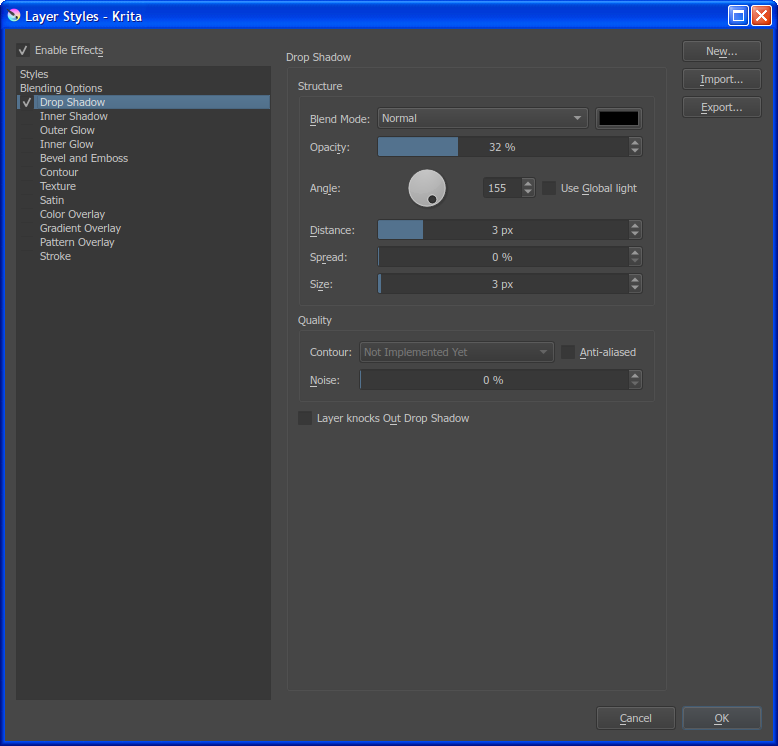
with-shadowsvariant, use the Krita settings below to generate the shadow)
- (if you're working on the
- Create the
xcursorgenconfiguration for each cursor under<theme>/cfg(eg./without-shadow/<theme>/res/<cursorname>.cfg) - Create the
index.themefile for both variants, please keep the naming/description uniform with thestandardtheme- Basically the
with-shadowvariant should have an identical name/description towithout-shadow, except the name should have(with pointer shadows)appended, and the description should have, with pointer shadowsappended
- Basically the
- Create the
mappingsfile to map each X cursor name to the theme's cursor names, use thestandardtheme as a guide
Once this is all done, you should be able to package using the script. The structure of theme sources allows the script to work without any specific configuration.
(Useful) Generating an XP-accurate pointer shadow in Krita
You should be able to replicate an XP-accurate pointer shadow using Krita on the cursor images. Add a Drop Shadow layer style and use these settings: