






|
Vulkan KomputeThe General Purpose Vulkan Compute Framework. |
Blazing fast, mobile-enabled, asynchronous, and optimized for advanced GPU processing usecases.
🔋 Documentation 💻 Blog Post ⌨ Examples 💾
Principles & Features
- Single header library for simple import to your project
- Documentation leveraging doxygen and sphinx
- Asynchronous & parallel processing capabilities with multi-queue command submission
- Non-Vulkan naming conventions to disambiguate Vulkan vs Kompute components
- BYOV: Bring-your-own-Vulkan design to play nice with existing Vulkan applications
- Explicit relationships for GPU and host memory ownership and memory management
- Short code examples showing the core features
- Longer tutorials for machine learning 🤖, mobile development 📱 and game development 🎮.

Getting Started
Setup
Kompute is provided as a single header file Kompute.hpp. See build-system section for configurations available.
Your First Kompute
Pass compute shader data in glsl/hlsl text or compiled SPIR-V format (or as path to the file). View more examples.
int main() {

    // You can allow Kompute to create the Vulkan components, or pass your existing ones
    kp::Manager mgr; // Selects device 0 unless explicitly requested

    // Creates tensor an initializes GPU memory (below we show more granularity)
    auto tensorA = std::make_shared<kp::Tensor>(kp::Tensor({ 3., 4., 5. }));
    auto tensorB = std::make_shared<kp::Tensor>(kp::Tensor({ 0., 0., 0. }));

    // Create tensors data explicitly in GPU with an operation
    mgr.evalOpDefault<kp::OpTensorCreate>({ tensorA, tensorB });

    // Define your shader as a string (using string literals for simplicity)
    // (You can also pass the raw compiled bytes, or even path to file)
    std::string shader(R"(
        #version 450

        layout (local_size_x = 1) in;

        layout(set = 0, binding = 0) buffer a { float pa[]; };
        layout(set = 0, binding = 1) buffer b { float pb[]; };

        void main() {
            uint index = gl_GlobalInvocationID.x;
            pb[index] = pa[index];
            pa[index] = index;
        }
    )");

    // Run Kompute operation on the parameters provided with dispatch layout
    mgr.evalOpDefault<kp::OpAlgoBase<3, 1, 1>>(
        { tensorA, tensorB },
        std::vector<char>(shader.begin(), shader.end()));

    // Sync the GPU memory back to the local tensor
    // You can run the job asynchronously with the Async function
    mgr.evalOpAsyncDefault<kp::OpTensorSyncLocal>({ tensorA, tensorB });

    // Await for the asynchonous default sequence to finish
    mgr.evalOpAwaitDefault();

    // Prints the output which is A: { 0, 1, 2 } B: { 3, 4, 5 }
    std::cout << fmt::format("A: {}, B: {}",
        tensorA.data(), tensorB.data()) << std::endl;
}
More examples
Simple examples
- Pass shader as raw string
- Record batch commands with a Kompute Sequence
- Run Asynchronous Operations
- Run Parallel Operations Across Multiple GPU Queues
- Create your custom Kompute Operations
- Implementing logistic regression from scratch
End-to-end examples
- Machine Learning Logistic Regression Implementation
- Android NDK Mobile Kompute ML Application
- Game Development Kompute ML in Godot Engine
Architectural Overview
The core architecture of Kompute include the following:
- Kompute Manager - Base orchestrator which creates and manages device and child components
- Kompute Sequence - Container of operations that can be sent to GPU as batch
- Kompute Operation (Base) - Individual operation which performs actions on top of tensors and (opt) algorithms
- Kompute Tensor - Tensor structured data used in GPU operations
- Kompute Algorithm - Abstraction for (shader) code executed in the GPU
To see a full breakdown you can read further in the C++ Class Reference.
| Full Vulkan Components | Simplified Kompute Components |
|---|---|
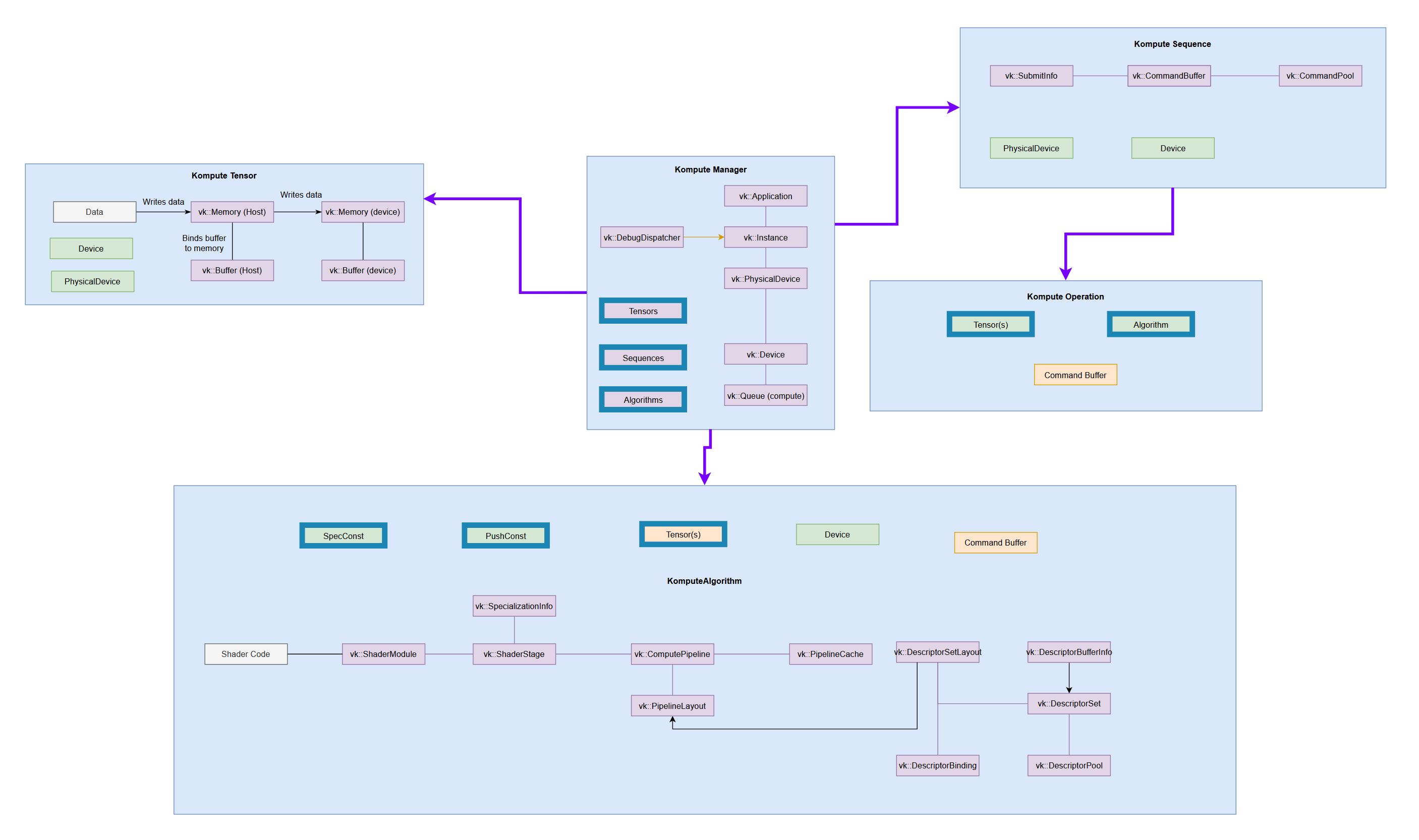
(very tiny, check the full reference diagram in docs for details) 
|
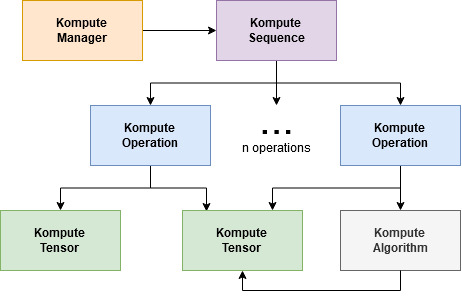
|
Asynchronous and Parallel Operations
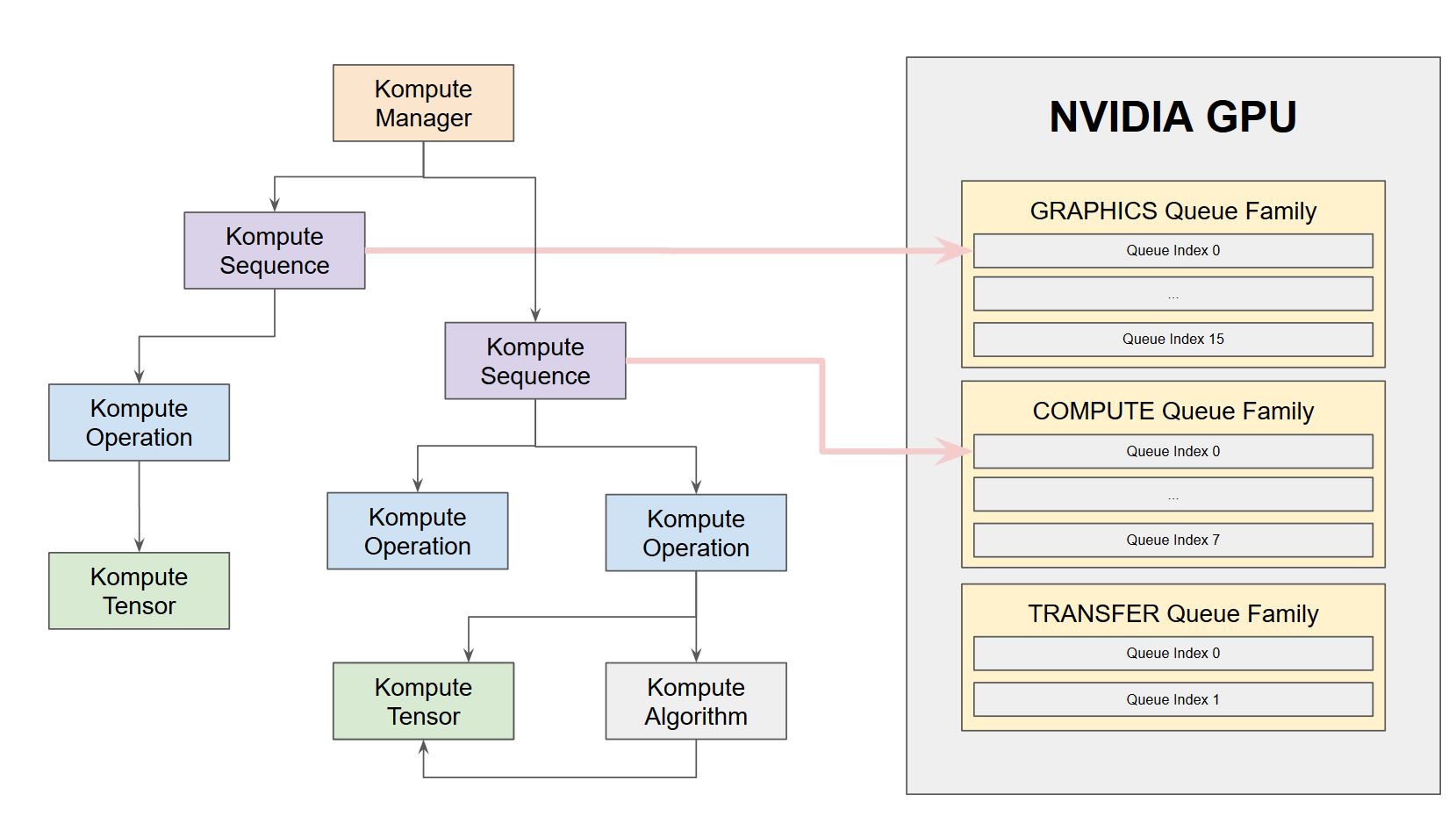
Kompute provides flexibility to run operations in an asynrchonous way through Vulkan Fences. Furthermore, Kompute enables for explicit allocation of queues, which allow for parallel execution of operations across queue families.
The image below provides an intuition how Kompute Sequences can be allocated to different queues for to enable parallel execution based on hardware. This allows for workloads to be run in parallel across the graphics and compute queue families.
You can see the hands on example, as well as the detailed documentation page describing how it would work using an NVIDIA 1650 as example.
Motivations
This project started after seeing that a lot of new and renowned ML & DL projects like Pytorch, Tensorflow, Alibaba DNN, between others, have either integrated or are looking to integrate the Vulkan GPU SDK to add mobile GPU (and cross-vendor GPU) support.
The Vulkan SDK offers a great low level interface that enables for highly specialized optimizations - however it comes at a cost of highly verbose code which requires 500-2000 lines of code to even begin writing application code. This has resulted in each of these projects having to implement the same baseline to abstract the non-compute related features of Vulkan, although it's not always the case, this can result in slower development cycles, and opportunities for bugs to be introduced.
We are currently developing Vulkan Kompute not to hide the Vulkan SDK interface (as it's incredibly well designed) but to augment it with a direct focus on Vulkan's GPU computing capabilities. This article provides a high level overview of the motivations of Kompute, together with a set of hands on examples that introduce both GPU computing as well as the core Vulkan Kompute architecture.
Build Overview
The build system provided is cmake which allows for cross platform builds. Below is a brief overview of the build system.
Build parameters (cmake)
The recommended approach to build the project is as out-of-source build in the build folder. This project comes with a Makefile that provides a set of commands that help with developer workflows. You can see some of the commands if you want to add some of the more advanced commands.
For a base build you just have to run:
cmake -Bbuild
This by default configures without any of the extra build tasks (such as building shaders) and compiles without the optional dependencies. The table below provides more detail.
| Flag | Description |
|---|---|
| -DCMAKE_INSTALL_PREFIX="build/src/CMakefiles/Export/" | Enables local installation (which won't require admin privileges) |
| -DCMAKE_TOOLCHAIN_FILE="..." | This is the path for your package manager if you use it such as vcpkg |
| -DKOMPUTE_OPT_BUILD_TESTS=1 | Enable if you wish to build and run the tests (must have deps installed. |
| -DKOMPUTE_OPT_BUILD_DOCS=1 | Enable if you wish to build the docs (must have docs deps installed) |
| -DKOMPUTE_OPT_BUILD_SINGLE_HEADER=1 | Option to build the single header file using "quom" utility |
| -DKOMPUTE_EXTRA_CXX_FLAGS="..." | Allows you to pass extra config flags to compiler |
| -DKOMPUTE_OPT_INSTALL=0 | Disables the install step in the cmake file (useful for android build) |
| -DKOMPUTE_OPT_ANDROID_BUILD=1 | Enables android build which includes and excludes relevant libraries |
Compile Flags
| Flag | Description |
|---|---|
| KOMPUTE_CREATE_PIPELINE_RESULT_VALUE | Ensure the return value of createPipeline is processed as ResultValue instead of Result |
| -DKOMPUTE_VK_API_VERSION="..." | Sets the default api version to use for vulkan kompute api |
| -DKOMPUTE_VK_API_MAJOR_VERSION=1 | Major version to use for the Vulkan API |
| -DKOMPUTE_VK_API_MINOR_VERSION=1 | Minor version to use for the Vulkan API |
| -DKOMPUTE_ENABLE_SPDLOG=1 | Enables the build with SPDLOG and FMT dependencies (must be installed) |
| -DKOMPUTE_LOG_VERRIDE=1 | Does not define the SPDLOG_ macros if these are to be overriden |
| -DSPDLOG_ACTIVE_LEVEL | The level for the log level on compile level (whether spdlog is enabled) |
| -DVVK_USE_PLATFORM_ANDROID_KHR | Flag to enable android imports in kompute (enabled with -DKOMPUTE_OPT_ANDROID_BUILD) |
| -DRELEASE=1 | Enable release build (enabled by cmake release build) |
| -DDEBUG=1 | Enable debug build including debug flags (enabled by cmake debug build) |
| -DKOMPUTE_DISABLE_VK_DEBUG_LAYERS | Disable the debug Vulkan layers, mainly used for android builds |
Dependencies
Given Kompute is expected to be used across a broad range of architectures and hardware, it will be important to make sure we are able to minimise dependencies.
Required dependencies
The only required dependency in the build is Vulkan (vulkan.h and vulkan.hpp which are both part of the Vulkan SDK).
Optional dependencies
SPDLOG is the preferred logging library, however by default Vulkan Kompute runs without SPDLOG by overriding the macros. It also provides an easy way to override the macros if you prefer to bring your own logging framework. The macro override is the following:
#ifndef KOMPUTE_LOG_OVERRIDE // Use this if you want to define custom macro overrides
#if KOMPUTE_SPDLOG_ENABLED // Use this if you want to enable SPDLOG
#include <spdlog/spdlog.h>
#endif //KOMPUTE_SPDLOG_ENABLED
// ... Otherwise it adds macros that use std::cout (and only print first element)
#endif // KOMPUTE_LOG_OVERRIDE
You can choose to build with or without SPDLOG by using the cmake flag KOMPUTE_OPT_ENABLE_SPDLOG.
Finally, remember that you will still need to set both the compile time log level with SPDLOG_ACTIVE_LEVEL, and the runtime log level with spdlog::set_level(spdlog::level::debug);.
Kompute Development
We appreciate PRs and Issues. If you want to contribute try checking the "Good first issue" tag, but even using Vulkan Kompute and reporting issues is a great contribution!
Contributing
Dev Dependencies
- Testing
- GTest
- Documentation
- Doxygen (with Dot)
- Sphynx
Development
- Follows Mozilla C++ Style Guide https://www-archive.mozilla.org/hacking/mozilla-style-guide.html
- Uses post-commit hook to run the linter, you can set it up so it runs the linter before commit
- All dependencies are defined in vcpkg.json
- Uses cmake as build system, and provides a top level makefile with recommended command
- Uses xxd (or xxd.exe windows 64bit port) to convert shader spirv to header files
- Uses doxygen and sphinx for documentation and autodocs
- Uses vcpkg for finding the dependencies, it's the recommanded set up to retrieve the libraries
Updating documentation
To update the documentation will need to:
- Run the gendoxygen target in the build system
- Run the gensphynx target in the buildsystem
- Push to github pages with
make push_docs_to_ghpages
Running tests
To run tests you can use the helper top level Makefile
For visual studio you can run
make vs_cmake
make vs_run_tests VS_BUILD_TYPE="Release"
For unix you can run
make mk_cmake MK_BUILD_TYPE="Release"
make mk_run_tests