






|
Vulkan KomputeThe General Purpose Vulkan Compute Framework. |
Blazing fast, lightweight, easy to set up and optimized for advanced data processing usecases.
🔋 Documentation 💻 Import to your project ⌨ Tutorials 💾
Principles & Features
- Single header library for simple import to your project
- Documentation leveraging doxygen and sphinx
- Non-Vulkan naming convention to disambiguate Vulkan vs Kompute components
- Extends the existing Vulkan API with a compute-specific interface
- BYOV: Play nice with existing Vulkan applications with a bring-your-own-Vulkan design
- Directed acyclic memory management and relationships of ownership
Getting Started
Setup
Kompute is provided as a single header file Kompute.hpp that can be simply included in your code.
You can go to our release page to grab the latest library or you can build from source.
Your first Kompute
Run your tensors against default operations via the Manager.
int main() {

    kp::Manager mgr; // Automatically selects Device 0

    auto tensorLhs = std::make_shared<kp::Tensor>(kp::Tensor({ 0, 1, 2 }));
    auto tensorRhs = std::make_shared<kp::Tensor>(kp::Tensor({ 2, 4, 6 }));
    auto tensorOut = std::make_shared<kp::Tensor>(kp::Tensor({ 0, 0, 0 }));

    auto params = std::vector<kp::Tensor>({ tensorLhs, tensorRhs, tensorOut })

    // Create tensor data in GPU
    mgr.evalOp<kp::OpCreateTensor>(params);

    // Run Kompute operation on the parameters provided with dispatch layout
    mgr.evalOp<kp::OpAlgoShader<3, 1, 1>>(params, "path/to/shader.comp.spv");

    // Print the output
    std::cout << fmt::format("Output: {}", tensorOutput.data()) << std::endl;
}
Create your own operations with full control on each of the steps.
template<uint32_t tX = 0, uint32_t tY = 0, uint32_t tZ = 0>
class OpCustom : public OpAlgoBase<tX, tY, tZ> {
    // ...
    OpCustom(std::shared_ptr<vk::PhysicalDevice> physicalDevice,
           std::shared_ptr<vk::Device> device,
           std::shared_ptr<vk::CommandBuffer> commandBuffer,
           std::vector<std::shared_ptr<Tensor>>& tensors)
      : OpAlgoBase<tX, tY, tZ>(physicalDevice, device, commandBuffer, tensors, true)
    {
        // ... extra steps to perform custom setup
        this->mOptSpirvBinPath = "shaders/glsl/opmult.comp.spv";
    }
}

int main() {
    kp::Manager mgr; // Automatically selects Device 0

    // Create parameters but don't initialise if customOp performs multiple
    auto tensorLhs = std::make_shared<kp::Tensor>(kp::Tensor({ 0, 1, 2 }));
    auto tensorRhs = std::make_shared<kp::Tensor>(kp::Tensor({ 2, 4, 6 }));
    auto tensorOut = std::make_shared<kp::Tensor>(kp::Tensor({ 0, 0, 0 }));

    // Pass parameters to custom operation which performs relevant steps
    mgr.evalOp<kp::OpCustom>({ tensorLHS, tensorRHS, tensorOutput });

    std::cout << fmt::format("Output: {}", tensorOutput.data()) << std::endl;
}
Record commands in a single submit by using a Sequence to send in batch to GPU.
int main() {

    kp::Manager mgr;

    std::shared_ptr<kp::Tensor> tensorLHS{ new kp::Tensor({ 0.0, 1.0, 2.0 }) };
    std::shared_ptr<kp::Tensor> tensorRHS{ new kp::Tensor( { 2.0, 4.0, 6.0 }) };
    std::shared_ptr<kp::Tensor> tensorOutput{ new kp::Tensor({ 0.0, 0.0, 0.0 }) };

    kp::Sequence sq = mgr.constructSequence();
    // Begin recoding commands
    sq.begin();

    // Record sequence of operations to be sent to GPU in batch
    {
        sq.record<kp::OpCreateTensor>({ tensorLHS });
        sq.record<kp::OpCreateTensor>({ tensorRHS });
        sq.record<kp::OpCreateTensor>({ tensorOutput });

        sq.record<kp::OpMult<>>({ tensorLHS, tensorRHS, tensorOutput });
    }

    // Stop recording
    sq.end();

    // Submit operations to GPU
    sq.eval();

    std::cout << fmt::format("Output: {}", tensorOutput.data()) << std::endl;
}
Motivations
Vulkan Kompute was created after identifying the challenge most GPU processing projects with Vulkan undergo - namely having to build extensive boilerplate for Vulkan and create abstractions and interfaces that expose the core compute capabilities. It is only after a few thousand lines of code that it's possible to start building the application-specific logic.
We believe Vulkan has an excellent design in its way to interact with the GPU, so by no means we aim to abstract or hide any complexity, but instead we want to provide a baseline of tools and interfaces that allow Vulkan Compute developers to focus on the higher level computational complexities of the application.
It is because of this that we have adopted development principles for the project that ensure the Vulkan API is augmented specifically for computation, whilst speeding development iterations and opening the doors to further use-cases.
Components & Architecture
The core architecture of Kompute include the following:
- Kompute Manager - Base orchestrator which creates and manages device and child components
- Kompute Sequence - Container of operations that can be sent to GPU as batch
- Kompute Operation - Individual operation which performs actions on top of tensors and (opt) algorithms
- Kompute Tensor - Tensor structured data used in GPU operations
- Kompute Algorithm - Abstraction for (shader) code executed in the GPU
- Kompute ParameterGroup - Container that can group tensors to be fed into an algorithm
To see a full breakdown you can read further in the documentation.
| Full Vulkan Components | Simplified Kompute Components |
|---|---|
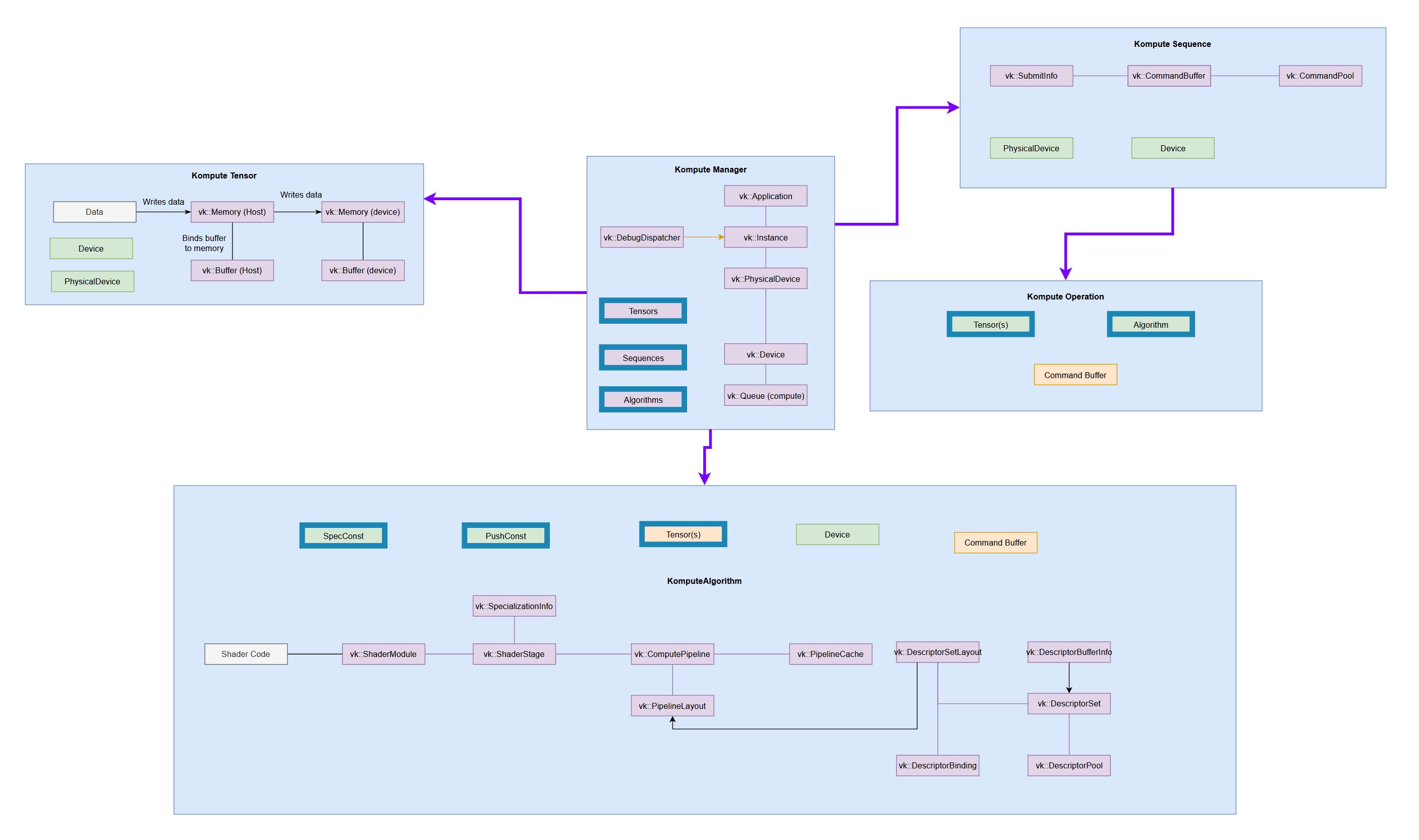
(very tiny, check the docs to for details) 
|
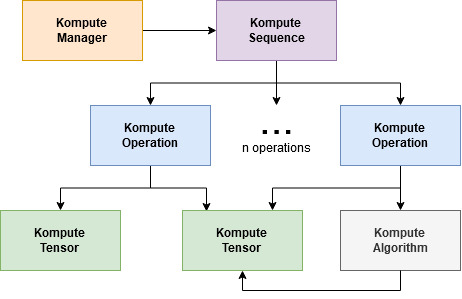
|
Kompute Development
We appreciate PRs and Issues. If you want to contribute try checking the "Good first issue" tag, but even using Vulkan Kompute and reporting issues is a great contribution!
Contributing
Dev Dependencies
- Testing
- Catch2
- Documentation
- Doxygen (with Dot)
- Sphynx
Development
- Follows Mozilla C++ Style Guide https://www-archive.mozilla.org/hacking/mozilla-style-guide.html
- Uses post-commit hook to run the linter, you can set it up so it runs the linter before commit
- All dependencies are defined in vcpkg.json
- Uses cmake as build system, and provides a top level makefile with recommended command
- Uses xxd (or xxd.exe windows 64bit port) to convert shader spirv to header files
- Uses doxygen and sphinx for documentation and autodocs
- Uses vcpkg for finding the dependencies, it's the recommanded set up to retrieve the libraries
Updating documentation
To update the documentation will need to:
- Run the gendoxygen target in the build system
- Run the gensphynx target in the buildsystem
- Push to github pages with
make push_docs_to_ghpages