mirror of
https://github.com/rozniak/xfce-winxp-tc.git
synced 2026-04-29 02:31:30 +00:00

run
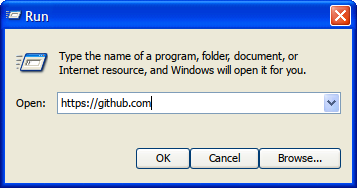
This directory contains the source code for the Run application.
Installation
See the README.MD under /packaging/deb/programs for packaging and installation.
Building
Standard CMake build:
mkdir buildcd buildcmake ..- (if you're missing libraries they will be mentioned here)
make
Keyboard Shortcut
You can add run to a keyboard shortcut on Win+R/super+R as follows:
- Open XFCE settings (if using the Start menu, opening Control Panel will take you there)
- Open the Keyboard section
- Select the Application Shortcuts tab
- Click Add (bottom left)
- Type or browse for
/usr/bin/run - Press the keyboard combination you would like to bind it with (typically
Win+R/super+R)
Once done you should be able to press the keyboard shortcut, and the Run dialog will appear in the bottom left as expected.