mirror of
https://github.com/DominikDoom/a1111-sd-webui-tagcomplete.git
synced 2026-01-27 03:29:55 +00:00
Compare commits
173 Commits
| Author | SHA1 | Date | |
|---|---|---|---|

|
0c8ed0d265 | ||
|
|
5cbb9cefc2 | ||
|
|
a7468da59b | ||
|
|
f4218a71cd | ||
|
|
eb19cae176 | ||
|
|
7bfe4f3b54 | ||
|
|
9b66d42111 | ||
|
|
7a5a7f31cf | ||
|
|
76cd4bb6f1 | ||
|
|
21b050a355 | ||
|
|
1cb4fc8f25 | ||
|
|
2d7e6181f5 | ||
|
|
c6049fc2fa | ||
|
|
eff53d0ca7 | ||
|
|
a7da670e97 | ||
|
|
da65feea31 | ||
|
|
6997558714 | ||
|
|
a95f422f10 | ||
|
|
5640a438da | ||
|
|
3169c4c653 | ||
|
|
bba5d6b1c0 | ||
|
|
7fbfb7dd43 | ||
|
|
2e93691305 | ||
|
|
eaba97dc3a | ||
|
|
5e453efc2b | ||
|
|
13c7f31bba | ||
|
|
c4c588c1d4 | ||
|
|
1d40449942 | ||
|
|
495feb026c | ||
|
|
b59123f6e6 | ||
|
|
79b670eaea | ||
|
|
6b51dc806b | ||
|
|
5b9af499c3 | ||
|
|
aed449c882 | ||
|
|
a724da362c | ||
|
|
cc67adf82f | ||
|
|
c1d610e390 | ||
|
|
7fabc84a1e | ||
|
|
5d5db7bafe | ||
|
|
40edb89974 | ||
|
|
f9f7732c69 | ||
|
|
e7af9dbfba | ||
|
|
64cf9b2159 | ||
|
|
ba38d1b893 | ||
|
|
4442cb78ec | ||
|
|
6b42efaa40 | ||
|
|
47e0c15835 | ||
|
|
68b4224f37 | ||
|
|
fc6c1ff579 | ||
|
|
50b33b987a | ||
|
|
ea24f7657a | ||
|
|
1e9431faba | ||
|
|
664ae50c1a | ||
|
|
43243a9bf1 | ||
|
|
8912957a26 | ||
|
|
5fe5398b94 | ||
|
|
52f92e4d42 | ||
|
|
0e177d0945 | ||
|
|
94365630c7 | ||
|
|
d4941c7b73 | ||
|
|
91fb1cba38 | ||
|
|
3169420fd3 | ||
|
|
84b6a0394e | ||
|
|
38fd2523e6 | ||
|
|
85db4a61df | ||
|
|
b18823e88f | ||
|
|
83461e2f54 | ||
|
|
a2e7b6bf6c | ||
|
|
f4572469c1 | ||
|
|
672d409e46 | ||
|
|
3b51035c26 | ||
|
|
dcc6602056 | ||
|
|
d1357cddc1 | ||
|
|
11d94e11f9 | ||
|
|
5fbc18ed1d | ||
|
|
223abf5420 | ||
|
|
4331bdccda | ||
|
|
c3f53e1a60 | ||
|
|
951e82f055 | ||
|
|
cd52a0577c | ||
|
|
873a15b5f6 | ||
|
|
811d4622e9 | ||
|
|
296b9456cc | ||
|
|
32c7749a5f | ||
|
|
afe3f23afa | ||
|
|
2571a4f70a | ||
|
|
f8e15307c6 | ||
|
|
95ebde9fce | ||
|
|
c08746a2c0 | ||
|
|
39abf1fe3a | ||
|
|
b047095f80 | ||
|
|
caf65bfda0 | ||
|
|
e7fa5aca18 | ||
|
|
f026e7631c | ||
|
|
15538336c9 | ||
|
|
12340c37cb | ||
|
|
d1fff7bfa7 | ||
|
|
647d3f7ec3 | ||
|
|
90664d47bf | ||
|
|
bc56c3ca72 | ||
|
|
823958507b | ||
|
|
712c4a5862 | ||
|
|
b5817b8d4a | ||
|
|
6269c40580 | ||
|
|
c1fb4619a4 | ||
|
|
a7c5c38c26 | ||
|
|
c14260c1fe | ||
|
|
76bd983ba3 | ||
|
|
2de1c720ee | ||
|
|
37e1c15e6d | ||
|
|
c16d110de3 | ||
|
|
f2c3574da7 | ||
|
|
b4fe4f717a | ||
|
|
9ff721ffcb | ||
|
|
f74cecf0aa | ||
|
|
b540400110 | ||
|
|
d29298e0cc | ||
|
|
cbeced9121 | ||
|
|
8dd8ccc527 | ||
|
|
beba0ca714 | ||
|
|
bb82f208c0 | ||
|
|
890f1a48c2 | ||
|
|
c70a18919b | ||
|
|
732a0075f8 | ||
|
|
86ead9b43d | ||
|
|
db3319b0d3 | ||
|
|
a588e0b989 | ||
|
|
b22435dd32 | ||
|
|
b0347d1ca7 | ||
|
|
fad8b3dc88 | ||
|
|
95eb9dd6e9 | ||
|
|
93ee32175d | ||
|
|
86fafeebf5 | ||
|
|
29d1e7212d | ||
|
|
8e14221739 | ||
|
|
cd80710708 | ||
|
|
3e0a7cc796 | ||
|
|
98000bd2fc | ||
|
|
d1d3cd2bf5 | ||
|
|
b70b0b72cb | ||
|
|
a831592c3c | ||
|
|
e00199cf06 | ||
|
|
dc34db53e4 | ||
|
|
a925129981 | ||
|
|
e418a867b3 | ||
|
|
040be35162 | ||
|
|
316d45e2fa | ||
|
|
8ab0e2504b | ||
|
|
b29b496b88 | ||
|
|
e144f0d388 | ||
|
|
ae01f41f30 | ||
|
|
fb27ac9187 | ||
|
|
770bb495a5 | ||
|
|
7fdad1bf62 | ||
|
|
a91a098243 | ||
|
|
c663abcbcb | ||
|
|
bec222f2b3 | ||
|
|
d4db6a7907 | ||
|
|
52593e6ac8 | ||
|
|
849e346924 | ||
|
|
25b285bea3 | ||
|
|
984a7e772a | ||
|
|
964b4fcff3 | ||
|
|
54641ddbfc | ||
|
|
c048684909 | ||
|
|
da9acfea2a | ||
|
|
552c6517b8 | ||
|
|
f626eb3467 | ||
|
|
2ba513bedc | ||
|
|
89d36da47e | ||
|
|
5f2f746310 | ||
|
|
454c13ef6d | ||
|
|
6deefda279 |
1
.gitignore
vendored
1
.gitignore
vendored
@@ -1 +1,2 @@
|
||||
tags/temp/
|
||||
__pycache__/
|
||||
|
||||
504
README.md
504
README.md
@@ -1,24 +1,72 @@
|
||||
|
||||
|
||||
# Booru tag autocompletion for A1111
|
||||
<div align="center">
|
||||
|
||||
[](https://github.com/DominikDoom/a1111-sd-webui-tagcomplete/releases)
|
||||
# SD WebUI Tag Autocomplete
|
||||
## English • [简体中文](./README_ZH.md) • [日本語](./README_JA.md)
|
||||
|
||||
## [中文文档](./README_ZH.md)
|
||||
Booru style tag autocompletion for the AUTOMATIC1111 Stable Diffusion WebUI
|
||||
|
||||
This custom script serves as a drop-in extension for the popular [AUTOMATIC1111 web UI](https://github.com/AUTOMATIC1111/stable-diffusion-webui) for Stable Diffusion.
|
||||
[![Github Release][release-shield]][release-url]
|
||||
[![stargazers][stargazers-shield]][stargazers-url]
|
||||
[![contributors][contributors-shield]][contributors-url]
|
||||
[![forks][forks-shield]][forks-url]
|
||||
[![issues][issues-shield]][issues-url]
|
||||
|
||||
[Changelog][release-url] •
|
||||
[Known Issues](#%EF%B8%8F-common-problems--known-issues) •
|
||||
[Report Bug][issues-url] •
|
||||
[Request Feature][issues-url]
|
||||
</div>
|
||||
<br/>
|
||||
|
||||
# 📄 Description
|
||||
|
||||
Tag Autocomplete is an extension for the popular [AUTOMATIC1111 web UI](https://github.com/AUTOMATIC1111/stable-diffusion-webui) for Stable Diffusion.
|
||||
|
||||
It displays autocompletion hints for recognized tags from "image booru" boards such as Danbooru, which are primarily used for browsing Anime-style illustrations.
|
||||
Since some Stable Diffusion models were trained using this information, for example [Waifu Diffusion](https://github.com/harubaru/waifu-diffusion), using exact tags in prompts can often improve composition and help to achieve a wanted look.
|
||||
Since some Stable Diffusion models were trained using this information, for example [Waifu Diffusion](https://github.com/harubaru/waifu-diffusion) and many of the NAI-descendant models or merges, using exact tags in prompts can often improve composition and consistency.
|
||||
|
||||
You can install it using the inbuilt available extensions list, clone the files manually as described [below](#installation), or use a pre-packaged version from [Releases](https://github.com/DominikDoom/a1111-sd-webui-tagcomplete/releases).
|
||||
You can install it using the inbuilt available extensions list, clone the files manually as described [below](#-installation), or use a pre-packaged version from [Releases](https://github.com/DominikDoom/a1111-sd-webui-tagcomplete/releases).
|
||||
|
||||
## Common Problems & Known Issues:
|
||||
- If `replaceUnderscores` is active, the script will currently only partially replace edited tags containing multiple words in brackets.
|
||||
For example, editing `atago (azur lane)`, it would be replaced with e.g. `taihou (azur lane), lane)`, since the script currently doesn't see the second part of the bracket as the same tag. So in those cases you should delete the old tag beforehand.
|
||||
<br/>
|
||||
|
||||
## Screenshots
|
||||
Demo video (with keyboard navigation):
|
||||
# ✨ Features
|
||||
- 🚀 Instant completion hints while typing (under normal circumstances)
|
||||
- ⌨️ Keyboard navigation
|
||||
- 🌒 Dark & Light mode support
|
||||
- 🛠️ Many [settings](#%EF%B8%8F-settings) and customizability
|
||||
- 🌍 [Translation support](#translations) for tags, with optional live preview for the full prompt
|
||||
- **Note:** Translation files are provided by the community, see [here](#list-of-translations) for a list of translations I know of.
|
||||
|
||||
Tag autocomplete supports built-in completion for:
|
||||
- 🏷️ **Danbooru & e621 tags** (Top 100k by post count, as of November 2022)
|
||||
- ✳️ [**Wildcards**](#wildcards)
|
||||
- ➕ [**Extra network**](#extra-networks-embeddings-hypernets-lora) filenames, including
|
||||
- Textual Inversion embeddings [(jump to readme section)]
|
||||
- Hypernetworks
|
||||
- LoRA
|
||||
- LyCORIS / LoHA
|
||||
- 🪄 [**Chants**](#chants) (custom format for longer prompt presets)
|
||||
- 🏷️ "[**Extra file**](#extra-file)", one set of customizable extra tags
|
||||
|
||||
|
||||
Additionally, some support for other third party extensions exists:
|
||||
<details>
|
||||
<summary>Click to expand</summary>
|
||||
|
||||
- [Image Browser][image-browser-url] - Filename & EXIF keyword search
|
||||
- [Multidiffusion Upscaler][multidiffusion-url] - Regional Prompts
|
||||
- [Dataset Tag Editor][tag-editor-url] - Caption, Interrogate Result, Edit Tags & Edit Caption
|
||||
- [WD 1.4 Tagger][wd-tagger-url] - Additional & Excluded tags
|
||||
- [Umi AI][umi-url] - Completion for YAML wildcards
|
||||
</details>
|
||||
<br/>
|
||||
|
||||
# 🖼️ Screenshots & Demo videos
|
||||
<details>
|
||||
<summary>Click to expand</summary>
|
||||
Basic usage (with keyboard navigation):
|
||||
|
||||
https://user-images.githubusercontent.com/34448969/200128020-10d9a8b2-cea6-4e3f-bcd2-8c40c8c73233.mp4
|
||||
|
||||
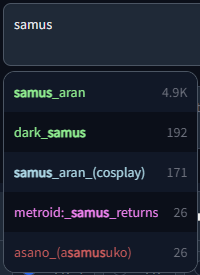
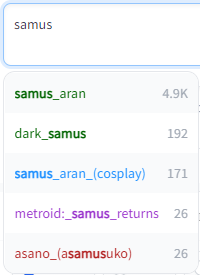
@@ -30,122 +78,355 @@ Dark and Light mode supported, including tag colors:
|
||||
|
||||
|
||||
|
||||
</details>
|
||||
<br/>
|
||||
|
||||
## Installation
|
||||
### As an extension (recommended)
|
||||
Either clone the repo into your extensions folder:
|
||||
# 📦 Installation
|
||||
## Using the built-in extension list
|
||||
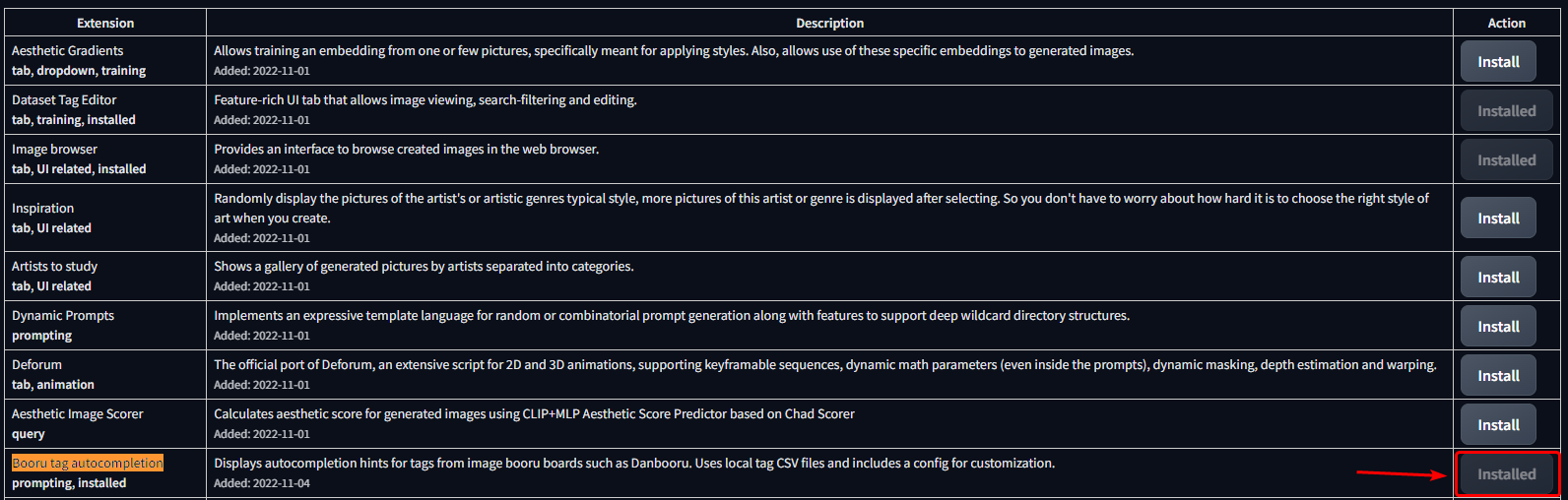
1. Open the `Extensions` tab
|
||||
2. Open the `Available` sub-tab
|
||||
3. Click **Load from**
|
||||
4. Find **Booru tag autocompletion** in the list
|
||||
- The extension was one of the first available, so selecting "oldest first" will show it high up in the list.
|
||||
- Alternatively, use <kbd>CRTL</kbd> + <kbd>F</kbd> to search for the text on the page
|
||||
5. Click **Install** on the right side
|
||||
|
||||

|
||||

|
||||
|
||||
|
||||
|
||||
## Manual clone
|
||||
```bash
|
||||
git clone "https://github.com/DominikDoom/a1111-sd-webui-tagcomplete.git" extensions/tag-autocomplete
|
||||
```
|
||||
(The second argument specifies the name of the folder, you can choose whatever you like).
|
||||
|
||||
Or create a folder there manually and place the `javascript`, `scripts` and `tags` folders in it.
|
||||
<br/>
|
||||
|
||||
### In the root folder (old)
|
||||
Copy the `javascript`, `scripts` and `tags` folder into your web UI installation root. It will run automatically the next time the web UI is started.
|
||||
# ❇️ Additional completion support
|
||||
## Wildcards
|
||||
Autocompletion also works with wildcard files used by https://github.com/AUTOMATIC1111/stable-diffusion-webui-wildcards or other similar scripts/extensions.
|
||||
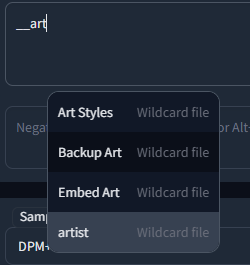
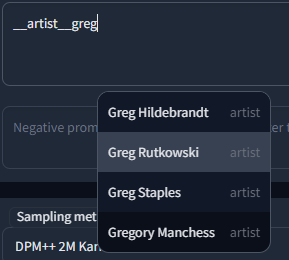
Completion is triggered by typing `__` (double underscore). It will first show a list of your wildcard files, and upon choosing one, the replacement options inside that file.
|
||||
This enables you to either insert categories to be replaced by the script, or directly choose one and use wildcards as a sort of categorized custom tag system.
|
||||
|
||||
---
|
||||
|
||||
|
||||
|
||||
In both configurations, the `tags` folder contains `colors.json` and the tag data the script uses for autocompletion. By default, Danbooru and e621 tags are included.
|
||||
After scanning for embeddings and wildcards, the script will also create a `temp` directory here which lists the found files so they can be accessed in the browser side of the script. You can delete the temp folder without consequences as it will be recreated on the next startup.
|
||||
|
||||
### Important:
|
||||
The script needs **all three folders** to work properly.
|
||||
Wildcards are searched for in every extension folder, as well as the `scripts/wildcards` folder to support legacy versions. This means that you can combine wildcards from multiple extensions. Nested folders are also supported if you have grouped your wildcards in that way.
|
||||
|
||||
## Wildcard & Embedding support
|
||||
Autocompletion also works with wildcard files used by [this script](https://github.com/jtkelm2/stable-diffusion-webui-1/blob/master/scripts/wildcards.py) of the same name or other similar scripts/extensions. This enables you to either insert categories to be replaced by the script, or even replace them with the actual wildcard file content in the same step. Wildcards are searched for in every extension folder as well as the `scripts/wildcards` folder to support legacy versions. This means that you can combine wildcards from multiple extensions. Nested folders are also supported if you have grouped your wildcards in that way.
|
||||
## Extra networks (Embeddings, Hypernets, LoRA, ...)
|
||||
Completion for these types is triggered by typing `<`. By default it will show them all mixed together, but further filtering can be done in the following way:
|
||||
- `<e:` will only show embeddings
|
||||
- `<l:` will only show LoRA and LyCORIS
|
||||
- Or `<lora:` and `<lyco:` respectively for the long form
|
||||
- `<h:` or `<hypernet:` will only show Hypernetworks
|
||||
|
||||
It also scans the embeddings folder and displays completion hints for the names of all .pt, .bin and .png files inside if you start typing `<`. Note that some normal tags also use < in Kaomoji (like ">_<" for example), so the results will contain both.
|
||||
### Embedding type filtering
|
||||
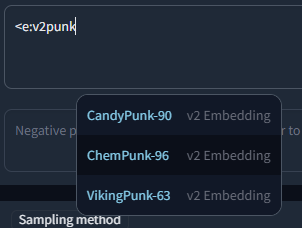
Embeddings trained for Stable Diffusion 1.x or 2.x models respectively are incompatible with the other type. To make it easier to find valid embeds, they are categorized by "v1 Embedding" and "v2 Embedding", including a slight color difference. You can also filter your search to include only v1 or v2 embeddings by typing `<v1/2` or `<e:v1/2` followed by the actual search term.
|
||||
|
||||
## Settings
|
||||
For example:
|
||||
|
||||
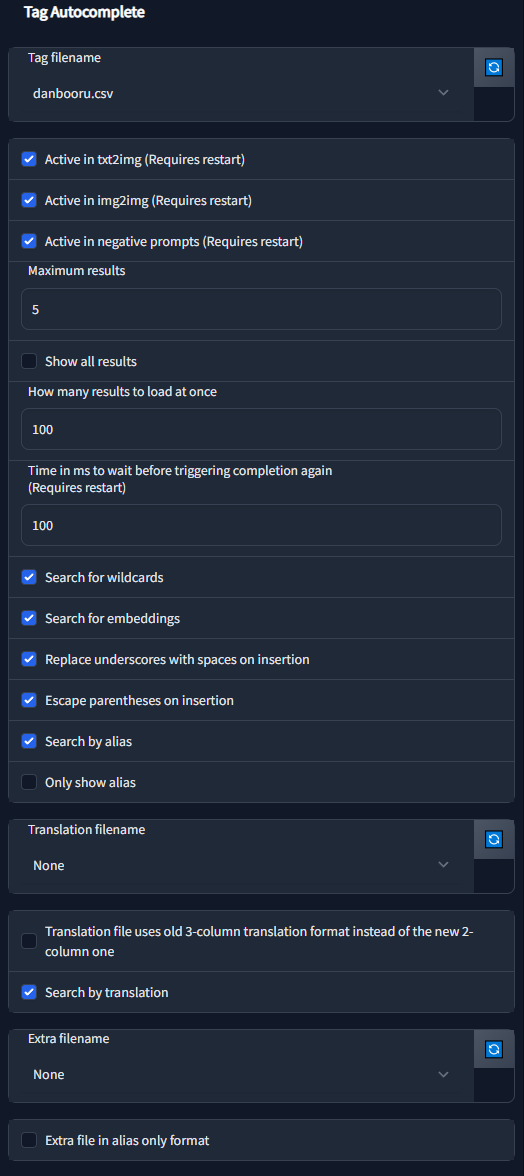
The extension has a large amount of configuration & customizability built in:
|
||||
|
||||
|
||||
|
||||
## Chants
|
||||
Chants are longer prompt presets. The name is inspired by some early prompt collections from Chinese users, which often were called along the lines of "Spellbook", "Codex", etc. The prompt snippets from such documents were fittingly called spells or chants for this reason.
|
||||
|
||||
| Setting | Description |
|
||||
|---------|-------------|
|
||||
| tagFile | Specifies the tag file to use. You can provide a custom tag database of your liking, but since the script was developed with Danbooru tags in mind, it might not work properly with other configurations.|
|
||||
| activeIn | Allows to selectively (de)activate the script for txt2img, img2img, and the negative prompts for both. |
|
||||
| maxResults | How many results to show max. For the default tag set, the results are ordered by occurence count. For embeddings and wildcards it will show all results in a scrollable list. |
|
||||
| resultStepLength | Allows to load results in smaller batches of the specified size for better performance in long lists or if showAllResults is true. |
|
||||
| delayTime | Specifies how much to wait in milliseconds before triggering autocomplete. Helps prevent too frequent updates while typing. |
|
||||
| showAllResults | If true, will ignore maxResults and show all results in a scrollable list. **Warning:** can lag your browser for long lists. |
|
||||
| replaceUnderscores | If true, undescores are replaced with spaces on clicking a tag. Might work better for some models. |
|
||||
| escapeParentheses | If true, escapes tags containing () so they don't contribute to the web UI's prompt weighting functionality. |
|
||||
| appendComma | Specifies the starting value of the "Append commas" UI switch. If UI options are disabled, this will always be used. |
|
||||
| useWildcards | Used to toggle the wildcard completion functionality. |
|
||||
| useEmbeddings | Used to toggle the embedding completion functionality. |
|
||||
| alias | Options for aliases. More info in the section below. |
|
||||
| translation | Options for translations. More info in the section below. |
|
||||
| extras | Options for additional tag files / aliases / translations. More info in the section below. |
|
||||
|
||||
### colors.json
|
||||
Additionally, tag type colors can be specified using the separate `colors.json` file in the extension's `tags` folder.
|
||||
You can also add new ones here for custom tag files (same name as filename, without the .csv). The first value is for dark, the second for light mode. Color names and hex codes should both work.
|
||||
```json
|
||||
{
|
||||
"danbooru": {
|
||||
"-1": ["red", "maroon"],
|
||||
"0": ["lightblue", "dodgerblue"],
|
||||
"1": ["indianred", "firebrick"],
|
||||
"3": ["violet", "darkorchid"],
|
||||
"4": ["lightgreen", "darkgreen"],
|
||||
"5": ["orange", "darkorange"]
|
||||
},
|
||||
"e621": {
|
||||
"-1": ["red", "maroon"],
|
||||
"0": ["lightblue", "dodgerblue"],
|
||||
"1": ["gold", "goldenrod"],
|
||||
"3": ["violet", "darkorchid"],
|
||||
"4": ["lightgreen", "darkgreen"],
|
||||
"5": ["tomato", "darksalmon"],
|
||||
"6": ["red", "maroon"],
|
||||
"7": ["whitesmoke", "black"],
|
||||
"8": ["seagreen", "darkseagreen"]
|
||||
}
|
||||
}
|
||||
Similar to embeddings and loras, this feature is triggered by typing the `<`, `<c:` or `<chant:` commands. For instance, when you enter `<c:HighQuality` in the prompt box and select it, the following prompt text will be inserted:
|
||||
```
|
||||
(masterpiece, best quality, high quality, highres, ultra-detailed),
|
||||
```
|
||||
The numbers are specifying the tag type, which is dependent on the tag source. For an example, see [CSV tag data](#csv-tag-data).
|
||||
|
||||
### Aliases, Translations & Extra tags
|
||||
#### Aliases
|
||||
Like on Booru sites, tags can have one or multiple aliases which redirect to the actual value on completion. These will be searchable / shown according to the settings in `config.json`:
|
||||
- `searchByAlias` - Whether to also search for the alias or only the actual tag.
|
||||
- `onlyShowAlias` - Shows only the alias instead of `alias -> actual`. Only for displaying, the inserted text at the end is still the actual tag.
|
||||
|
||||
#### Translations
|
||||
Chants can be added in JSON files following this format:
|
||||
<details>
|
||||
<summary>Chant format (click to expand)</summary>
|
||||
|
||||
```json
|
||||
[
|
||||
{
|
||||
"name": "Basic-NegativePrompt",
|
||||
"terms": "Negative,Low,Quality",
|
||||
"content": "(worst quality, low quality, normal quality)",
|
||||
"color": 3
|
||||
},
|
||||
{
|
||||
"name": "Basic-HighQuality",
|
||||
"terms": "Best,High,Quality",
|
||||
"content": "(masterpiece, best quality, high quality, highres, ultra-detailed)",
|
||||
"color": 1
|
||||
},
|
||||
{
|
||||
"name": "Basic-Start",
|
||||
"terms": "Basic, Start, Simple, Demo",
|
||||
"content": "(masterpiece, best quality, high quality, highres), 1girl, extremely beautiful detailed face, ...",
|
||||
"color": 5
|
||||
}
|
||||
]
|
||||
```
|
||||
</details>
|
||||
<br/>
|
||||
|
||||
The file can then be selected using the "Chant file" settings dropdown if it is located inside the extension's `tags` folder.
|
||||
|
||||
A chant object has four fields:
|
||||
- `name` - Display name
|
||||
- `terms` - Search terms
|
||||
- `content` - The actual prompt content
|
||||
- `color` - Color, using the same category color system as normal tags
|
||||
|
||||
## Umi AI tags
|
||||
https://github.com/Klokinator/Umi-AI is a feature-rich wildcard extension similar to Unprompted or Dynamic Wildcards.
|
||||
In recent releases, it uses YAML-based wildcard tags to enable a complex chaining system,for example `<[preset][--female][sfw][species]>` will choose the preset category, exclude female related tags, further narrow it down with the following categories, and then choose one random fill-in matching all these criteria at runtime. Completion is triggered by `<[` and then each following new unclosed bracket, e.g. `<[xyz][`, until closed by `>`.
|
||||
|
||||
Tag Autocomplete can recommend these options in a smart way, meaning while you continue to add category tags, it will only show results still matching what comes before.
|
||||
It also shows how many fill-in tags are available to choose from for that combo in place of the tag post count, enabling a quick overview and filtering of the large initial set.
|
||||
|
||||
Most of the credit goes to [@ctwrs](https://github.com/ctwrs) here, they contributed a lot as one of the Umi developers.
|
||||
|
||||
# 🛠️ Settings
|
||||
|
||||
The extension has a large amount of configuration & customizability built in. Most should be self-explanatory, but for a detailed description click on a section below.
|
||||
|
||||
<!-- Filename -->
|
||||
<details>
|
||||
<summary>Tag filename</summary>
|
||||
|
||||
The main tag file the script uses. Included by default are `danbooru.csv` and `e621.csv`. While you can add custom tags here, the vast majority of models are not trained on anything other than these two (mostly danbooru), so it will not have much benefit.
|
||||
|
||||
You can also set it to `None` if you want to use other functionality of the extension (e.g. Wildcard or LoRA completion), but aren't interested in the normal tags.
|
||||
|
||||

|
||||
</details>
|
||||
<!-- Active In -->
|
||||
<details>
|
||||
<summary>"Active in" settings</summary>
|
||||
|
||||
Specifies where tag autocomplete should attach itself to and listen for changes.
|
||||
Negative prompts follow the settings for txt2img & img2img, so they will only be active if their "parent" is active.
|
||||
|
||||

|
||||
</details>
|
||||
<!-- Blacklist -->
|
||||
<details>
|
||||
<summary>Black / Whitelist</summary>
|
||||
|
||||
While the above options can turn off tag autocomplete globally, sometimes you might want to enable or disable it only for specific models. For example, if most of your models are Anime ones, you could add your photorealistic models, that weren't trained on booru tags and don't benefit from it, to the blacklist, which will automatically disable it after you switch to these models. You can use both the model name (including file extension) and their webui hashes (both short and long form).
|
||||
|
||||
`Blacklist` will exclude all specified models, while `Whitelist` will only activate it for these and stay off by default. One exception is an empty whitelist, which will be ignored (making it the same as an empty blacklist).
|
||||
|
||||

|
||||
</details>
|
||||
<!-- Move Popup -->
|
||||
<details>
|
||||
<summary>Move completion popup with cursor</summary>
|
||||
|
||||
This option enables or disables the floating popup to follow the position of your cursor, like it would do in an IDE. The script tries to reserve enough room for the popup to prevent squishing on the right side, but that doesn't always work for longer tags. If disabled, the popup will stay on the left.
|
||||
|
||||

|
||||
|
||||

|
||||

|
||||
</details>
|
||||
<!-- Results Count -->
|
||||
<details>
|
||||
<summary>Result count</summary>
|
||||
|
||||
Settings for the amount of results to show at once.
|
||||
If `Show all results` is active, it will show a scrollable list instead of cutting it off after the number specified in `Maximum results`. For performance reasons, in that case not all are loaded at once, but instead in blocks. The block size is dictated by `How many results to load at once`. Once you reach the bottom, the next block will load (but that should rarely happen).
|
||||
|
||||
Notably, `Maximum results` will still have an influence if `Show all results` is used, since it dictates the height of the popup before scrolling begins.
|
||||
|
||||

|
||||
</details>
|
||||
<!-- Delay time -->
|
||||
<details>
|
||||
<summary>Completion delay</summary>
|
||||
|
||||
Depending on the configuration, real time tag completion can get computationally expensive.
|
||||
This option sets a "debounce" delay in milliseconds (1000ms = 1s), during which no second completion will get queried. This might especially be useful if you type very fast.
|
||||
|
||||

|
||||
</details>
|
||||
<!-- Search for -->
|
||||
<details>
|
||||
<summary>"Search for" settings</summary>
|
||||
|
||||
Pretty self explanatory, enables or disables certain completion types.
|
||||
|
||||
Umi AI wildcards are included in the normal wildcard option here, although they use a different format, since their usage intention is similar.
|
||||
|
||||

|
||||
</details>
|
||||
<!-- Wiki links -->
|
||||
<details>
|
||||
<summary>"?" Wiki links</summary>
|
||||
|
||||
If this option is turned on, it will show a `?` link next to the tag. Clicking this will try to open the wiki page for that tag on danbooru or e621, depending on which tag file you use.
|
||||
|
||||
> ⚠️ Warning:
|
||||
>
|
||||
> Danbooru and e621 are external sites and include a lot of NSFW content, which might show in the list of examples for a tag on its wiki page. Because of this, the option is disabled by default.
|
||||
|
||||

|
||||
</details>
|
||||
<!-- Insertion -->
|
||||
<details>
|
||||
<summary>Completion settings</summary>
|
||||
|
||||
These settings specify how the text will be inserted.
|
||||
|
||||
Booru sites mostly use underscores in tags instead of spaces, but during preprocessing most models replaced this back with spaces since the CLIP encoder used in Stable diffusion was trained on natural language. Thus, by default tag autocomplete will as well.
|
||||
|
||||
Parentheses are used as control characters in the webui to give more attention / weight to a specific part of the prompt, so tags including parentheses are escaped (`\( \)`) by default to not influence that.
|
||||
|
||||
Depending on the last setting, tag autocomplete will append a comma and space after inserting a tag, which may help for rapid completion of multiple tags in a row.
|
||||
|
||||

|
||||
</details>
|
||||
<!-- Alias -->
|
||||
<details>
|
||||
<summary>Alias settings</summary>
|
||||
|
||||
Tags often are referred to with multiple aliases. If `Search by alias` is turned on, those will be included in the search results, which might help if you are unsure of the correct tag. They will still get replaced by the actual tag they are linked to on insertion, since that is what the models were trained on.
|
||||
|
||||
`Only show alias` sets if you want to see only the alias or also the tag it maps to
|
||||
(shown as `<alias> ➝ <actual>`)
|
||||
|
||||

|
||||
</details>
|
||||
<!-- Translations -->
|
||||
<details>
|
||||
<summary>Translation settings</summary>
|
||||
|
||||
Tag Autocomplete has support for tag translations specified in a separate file (`Translation filename`). You can search for tags using those translations, meaning that if you don't know the English tagword and have a translation file in your native language, you can use that instead.
|
||||
|
||||
It also has a legacy format option for some old files used in the community, as well as an experimental live translation preview for the whole prompt so you can easily find and edit tags afterwards.
|
||||
|
||||
For more details, see the [section on translations](#translations) below.
|
||||
|
||||

|
||||
</details>
|
||||
<!-- Extra file -->
|
||||
<details>
|
||||
<summary>Extra file settings</summary>
|
||||
|
||||
Specifies a set of extra tags that get appended either before or after the regular results, as specified here. Mostly useful for small custom tag sets such as the commonly used quality tags (masterpiece, best quality, etc.)
|
||||
|
||||
If you want completion for longer presets or even whole prompts, have a look at [Chants](#chants) instead.
|
||||
|
||||

|
||||
</details>
|
||||
<!-- Chants -->
|
||||
<details>
|
||||
<summary>Chant filename</summary>
|
||||
|
||||
Chants are longer presets or even whole prompts that can be selected & inserted at once, similar to the built in styles dropdown of the webui. They do offer some additional features though, and are faster to use.
|
||||
|
||||
For more info, see the section on [Chants](#chants) above.
|
||||
|
||||

|
||||
</details>
|
||||
<!-- Hotkeys -->
|
||||
<details>
|
||||
<summary>Hotkeys</summary>
|
||||
|
||||
You can specify the hotkeys for most keyboard navigation features here.
|
||||
Should be one of the key names specified in https://www.w3.org/TR/uievents-key/#named-key-attribute-value.
|
||||
|
||||
Function explanation:
|
||||
- Move Up / Down: Select the next tag
|
||||
- Jump Up / Down: Move by five places at once
|
||||
- Jump to Start / End: Jump to the top or bottom of the list
|
||||
- ChooseSelected: Select the highlighted tag, or close popup if nothing was selected
|
||||
- ChooseSelectedOrFirst: Same as above, but default to the first result if nothing was selected
|
||||
- Close: Closes the popup
|
||||
|
||||

|
||||
</details>
|
||||
<!-- Colors -->
|
||||
<details>
|
||||
<summary>Colors</summary>
|
||||
|
||||
Here, you can change the default colors used for different tag categories. They were chosen to be similar to the category colors of their source site.
|
||||
|
||||
The format is standard JSON
|
||||
- The object names correspond to the tag filename they should be used for.
|
||||
- The numbers are specifying the tag type, which is dependent on the tag source. For more info, see [CSV tag data](#csv-tag-data).
|
||||
- The first value in the square brackets is for dark, the second for light mode. HTML color names and hex codes should both work.
|
||||
|
||||
This can also be used to add new color sets for custom tag files.
|
||||
|
||||

|
||||
</details>
|
||||
<!-- Temp files refresh -->
|
||||
<details>
|
||||
<summary>Refresh TAC temp files</summary>
|
||||
|
||||
This is a "fake" setting, meaning it doesn't actually configure anything. Rather, it is a small hack to abuse the refresh button developers can add to webui options. Clicking on the refresh button next to this setting will force tag autocomplete to recreate and reload some temporary internal files, which normally only happens on restarting the UI.
|
||||
|
||||
Tag autocomplete depends on these files for various functionality, especially related to extra networks and wildcard completion. This setting can be used to rebuild the lists if you have, for example, added a few new LoRAs into the folder and don't want to restart the UI to get tag autocomplete to list them.
|
||||
|
||||
You can also add this to your quicksettings bar to have the refresh button available at all times.
|
||||
|
||||

|
||||
</details>
|
||||
<br/>
|
||||
|
||||
# Translations
|
||||
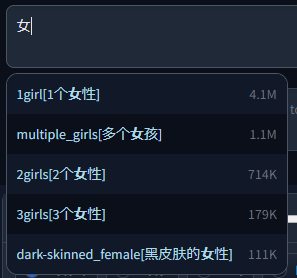
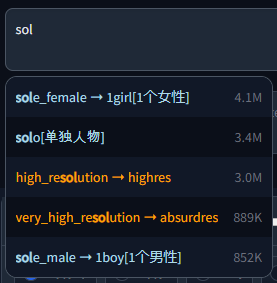
An additional file can be added in the translation section, which will be used to translate both tags and aliases and also enables searching by translation.
|
||||
This file needs to be a CSV in the format `<English tag/alias>,<Translation>`, but for backwards compatibility with older extra files that used a three column format, you can turn on `oldFormat` to use that instead.
|
||||
This file needs to be a CSV in the format `<English tag/alias>,<Translation>`, but for backwards compatibility with older files that used a three column format, you can turn on `Translation file uses old 3-column translation format instead of the new 2-column one` to support them. In that case, the second column will be unused and skipped during parsing.
|
||||
|
||||
Example with chinese translation:
|
||||
Example with Chinese translation:
|
||||
|
||||
|
||||
|
||||
|
||||
**Important**
|
||||
As of a recent update, translations added in the old Extra file way will only work as an alias and not be visible anymore if typing the English tag for that translation.
|
||||
## List of translations
|
||||
- [🇨🇳 Chinese tags](https://github.com/DominikDoom/a1111-sd-webui-tagcomplete/discussions/23) by @HalfMAI, using machine translation and manual correction for the most common tags (uses legacy format)
|
||||
- [🇨🇳 Chinese tags](https://github.com/sgmklp/tag-for-autocompletion-with-translation) by @sgmklp, smaller set of manual translations based on https://github.com/zcyzcy88/TagTable
|
||||
|
||||
#### Extra file
|
||||
Aliases can be added in multiple ways, which is where the "Extra" file comes into play.
|
||||
1. As an extra file containing tag, category, optional count and the new alias. Will be matched to the English tags in the main file based on the name & type, so might be slow for large files.
|
||||
2. As an extra file with `onlyAliasExtraFile` true. With this configuration, the extra file has to include *only* the alias itself. That means it is purely index based, assigning the aliases to the main tags is really fast but also needs the lines to match (including empty lines). If the order or amount in the main file changes, the translations will potentially not match anymore. Not recommended.
|
||||
> ### 🫵 I need your help!
|
||||
> Translations are a community effort. If you have translated a tag file or want to create one, please open a Pull Request or Issue so your link can be added here.
|
||||
> Please make sure the quality is alright though, machine translation gets a lot of stuff wrong even for the most common tags.
|
||||
|
||||
So your CSV values would look like this for each method:
|
||||
| | 1 | 2 |
|
||||
|------------|--------------------------|--------------------------|
|
||||
| Main file | `tag,type,count,(alias)` | `tag,type,count,(alias)` |
|
||||
| Extra file | `tag,type,(count),alias` | `alias` |
|
||||
## Live preview
|
||||
> ⚠️ Warning:
|
||||
>
|
||||
> This feature is still experimental, you might encounter some bugs when using it.
|
||||
|
||||
Count in the extra file is optional, since there isn't always a post count for custom tag sets.
|
||||
This will show a live preview of all detected tags in the prompt, both correctly separated by commas as well as in a longer sentence. It can detect up to three-word pairs in natural sentences, preferring perfect multi-word matches over single tags.
|
||||
|
||||
The extra files can also be used to just add new / custom tags not included in the main set, provided `onlyAliasExtraFile` is false.
|
||||
If an extra tag doesn't match any existing tag, it will be added to the list as a new tag instead. For this, it will need to include the post count and alias columns even if they don't contain anything, so it could be in the form of `tag,type,,`.
|
||||
Above the detected tags will be their translation from the translation file, so if you aren't sure what the English tag means, you can easily find it there even after they have been inserted into the prompt (instead of just in the popup during completion).
|
||||
|
||||
##### WARNING
|
||||
Do not use e621.csv or danbooru.csv as an extra file. Alias comparison has exponential runtime, so for the combination of danbooru+e621, it will need to do 10,000,000,000 (yes, ten billion) lookups and usually take multiple minutes to load.
|
||||
The option defaults to off, but you can activate it by choosing a translation file and checking "Show live tag translation below prompt".
|
||||
It will not affect the normal functionality if it is off.
|
||||
|
||||
## CSV tag data
|
||||
Example with Chinese translation:
|
||||
|
||||

|
||||
|
||||
Clicking on a detected tag will also select it in the prompt for quick editing.
|
||||
|
||||

|
||||
|
||||
#### ⚠️ Known issues with live translation:
|
||||
The translation updates when the user types or pastes text, but not if the action happens programmatically (e.g. applying a style or loading from PNG Info / Image Browser). This can be worked around by typing something manually after the programmatic edit.
|
||||
|
||||
# Extra file
|
||||
An extra file can be used to add new / custom tags not included in the main set.
|
||||
The format is identical to the normal tag format shown in [CSV tag data](#csv-tag-data) below, with one exception:
|
||||
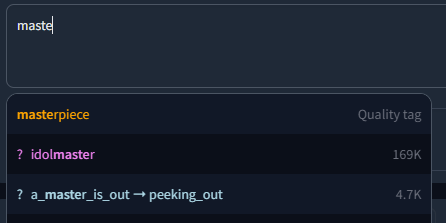
Since custom tags likely have no count, column three (or two if counting from zero) is instead used for the gray meta text displayed next to the tag.
|
||||
If left empty, it will instead show "Custom tag".
|
||||
|
||||
An example with the included (very basic) extra-quality-tags.csv file:
|
||||
|
||||
|
||||
|
||||
Whether the custom tags should be added before or after the normal tags can be chosen in the settings.
|
||||
|
||||
# CSV tag data
|
||||
The script expects a CSV file with tags saved in the following way:
|
||||
```csv
|
||||
<name>,<type>,<postCount>,"<aliases>"
|
||||
@@ -184,3 +465,34 @@ or similarly for e621:
|
||||
|8 | Lore |
|
||||
|
||||
The tag type is used for coloring entries in the result list.
|
||||
|
||||
|
||||
## ⚠️ Common Problems & Known Issues:
|
||||
- Depending on your browser settings, sometimes an old version of the script can get cached. Try
|
||||
<kbd>CTRL</kbd> + <kbd>F5</kbd>
|
||||
to force-reload the site without cache if e.g. a new feature doesn't appear for you after an update.
|
||||
- If the prompt popup has broken styling for you or doesn't appear at all (like [this](https://github.com/DominikDoom/a1111-sd-webui-tagcomplete/assets/34448969/7bbfdd54-fc23-4bfc-85af-24704b139b3a)), make sure to update your **openpose-editor** extension if you have it installed. It is known to cause issues with other extensions in older versions.
|
||||
|
||||
|
||||
<!-- Variable declarations for shorter main text -->
|
||||
[release-shield]: https://img.shields.io/github/v/release/DominikDoom/a1111-sd-webui-tagcomplete?logo=github&style=
|
||||
[release-url]: https://github.com/DominikDoom/a1111-sd-webui-tagcomplete/releases
|
||||
|
||||
[contributors-shield]: https://img.shields.io/github/contributors/DominikDoom/a1111-sd-webui-tagcomplete
|
||||
[contributors-url]: https://github.com/DominikDoom/a1111-sd-webui-tagcomplete/graphs/contributors
|
||||
|
||||
[forks-shield]: https://img.shields.io/github/forks/DominikDoom/a1111-sd-webui-tagcomplete
|
||||
[forks-url]: https://github.com/DominikDoom/a1111-sd-webui-tagcomplete/network/members
|
||||
|
||||
[stargazers-shield]: https://img.shields.io/github/stars/DominikDoom/a1111-sd-webui-tagcomplete
|
||||
[stargazers-url]: https://github.com/DominikDoom/a1111-sd-webui-tagcomplete/stargazers
|
||||
|
||||
[issues-shield]: https://img.shields.io/github/issues/DominikDoom/a1111-sd-webui-tagcomplete
|
||||
[issues-url]: https://github.com/DominikDoom/a1111-sd-webui-tagcomplete/issues/new/choose
|
||||
|
||||
<!-- Links for feature section -->
|
||||
[image-browser-url]: https://github.com/AlUlkesh/stable-diffusion-webui-images-browser
|
||||
[multidiffusion-url]: https://github.com/pkuliyi2015/multidiffusion-upscaler-for-automatic1111
|
||||
[tag-editor-url]: https://github.com/toshiaki1729/stable-diffusion-webui-dataset-tag-editor
|
||||
[wd-tagger-url]: https://github.com/toriato/stable-diffusion-webui-wd14-tagger
|
||||
[umi-url]: https://github.com/Klokinator/Umi-AI
|
||||
254
README_JA.md
Normal file
254
README_JA.md
Normal file
@@ -0,0 +1,254 @@
|
||||

|
||||
|
||||
# Booru tag autocompletion for A1111
|
||||
|
||||
[](https://github.com/DominikDoom/a1111-sd-webui-tagcomplete/releases)
|
||||
|
||||
## [English Document](./README.md), [中文文档](./README_ZH.md)
|
||||
|
||||
このカスタムスクリプトは、Stable Diffusion向けの人気のweb UIである、[AUTOMATIC1111 web UI](https://github.com/AUTOMATIC1111/stable-diffusion-webui)の拡張機能として利用できます。
|
||||
|
||||
主にアニメ系イラストを閲覧するための掲示板「Danbooru」などで利用されているタグの自動補完ヒントを表示するための拡張機能となります。
|
||||
[Waifu Diffusion](https://github.com/harubaru/waifu-diffusion)など、この情報を使って学習させたStable Diffusionモデルもあるため、正確なタグをプロンプトに使用することで、構図を改善し、思い通りの画像が生成できるようになります。
|
||||
|
||||
web UIに内蔵されている利用可能な拡張機能リストを使用してインストールするか、[以下の説明](#インストール)に従ってファイルを手動でcloneするか、または[リリース](https://github.com/DominikDoom/a1111-sd-webui-tagcomplete/releases)からパッケージ化されたバージョンを使用することができます。
|
||||
|
||||
## よく発生する問題 & 発見されている課題:
|
||||
- ブラウザの設定によっては、古いバージョンのスクリプトがキャッシュされていることがあります。アップデート後に新機能が表示されない場合などには、`CTRL+F5`でキャッシュを利用せずにサイトを強制的にリロードしてみてください。
|
||||
- プロンプトのポップアップのスタイルが崩れていたり、全く表示されない場合([このような場合](https://github.com/DominikDoom/a1111-sd-webui-tagcomplete/assets/34448969/7bbfdd54-fc23-4bfc-85af-24704b139b3a))、openpose-editor拡張機能をインストールしている場合は、必ずアップデートしてください。古いバージョンでは、他の拡張機能との間で問題が発生することが知られています。
|
||||
|
||||
## スクリーンショット & デモ動画
|
||||
<details>
|
||||
<summary>クリックすると開きます</summary>
|
||||
基本的な使い方 (キーボード操作を用いたもの):
|
||||
|
||||
https://user-images.githubusercontent.com/34448969/200128020-10d9a8b2-cea6-4e3f-bcd2-8c40c8c73233.mp4
|
||||
|
||||
ワイルドカードをサポート:
|
||||
|
||||
https://user-images.githubusercontent.com/34448969/200128031-22dd7c33-71d1-464f-ae36-5f6c8fd49df0.mp4
|
||||
|
||||
タグカラーを含むDarkモードとLightモードに対応:
|
||||
|
||||

|
||||

|
||||
</details>
|
||||
|
||||
## インストール
|
||||
### 内蔵されている拡張機能リストを用いた方法
|
||||
1. Extensions タブを開く
|
||||
2. Available タブを開く
|
||||
3. "Load from:" をクリック
|
||||
4. リストの中から "Booru tag autocompletion" を探す
|
||||
- この拡張機能は最初から利用可能だったものなので、 "oldest first" を選択すると、リストの上位に表示されます。
|
||||
5. 右側にある "Install" をクリック
|
||||
|
||||

|
||||

|
||||

|
||||
|
||||
|
||||
### 手動でcloneする方法
|
||||
```bash
|
||||
git clone "https://github.com/DominikDoom/a1111-sd-webui-tagcomplete.git" extensions/tag-autocomplete
|
||||
```
|
||||
(第2引数でフォルダ名を指定可能なので、好きな名前を指定しても良いでしょう)
|
||||
|
||||
## 追加で有効化できる補完機能
|
||||
### ワイルドカード
|
||||
|
||||
自動補完は、https://github.com/AUTOMATIC1111/stable-diffusion-webui-wildcards 、または他の類似のスクリプト/拡張機能で使用されるワイルドカードファイルでも利用可能です。補完は `__` (ダブルアンダースコア) と入力することで開始されます。最初にワイルドカードファイルのリストが表示され、1つを選択すると、そのファイル内の置換オプションが表示されます。
|
||||
これにより、スクリプトによって置換されるカテゴリを挿入するか、または直接1つを選択して、ワイルドカードをカテゴリ化されたカスタムタグシステムのようなものとして使用することができます。
|
||||
|
||||

|
||||

|
||||
|
||||
|
||||
ワイルドカードはすべての拡張機能フォルダと、古いバージョンをサポートするための `scripts/wildcards` フォルダで検索されます。これは複数の拡張機能からワイルドカードを組み合わせることができることを意味しています。ワイルドカードをグループ化した場合、ネストされたフォルダもサポートされます。
|
||||
|
||||
### Embeddings, Lora & Hypernets
|
||||
これら3つのタイプの補完は、`<`と入力することで行われます。デフォルトでは3つとも混在して表示されますが、以下の方法でさらにフィルタリングを行うことができます:
|
||||
- `<e:` は、embeddingsのみを表示します。
|
||||
- `<l:` 、または `<lora:` はLoraのみを表示します。
|
||||
- `<h:` 、または `<hypernet:` はHypernetworksのみを表示します
|
||||
|
||||
#### Embedding type filtering
|
||||
Stable Diffusion 1.xまたは2.xモデル用にそれぞれトレーニングされたembeddingsは、他のタイプとの互換性がありません。有効なembeddingsを見つけやすくするため、若干の色の違いも含めて「v1 Embedding」と「v2 Embedding」で分類しています。また、`<v1/2`または`<e:v1/2`に続けて実際の検索のためのキーワードを入力すると、v1またはv2embeddingsのみを含むように検索を絞り込むことができます。
|
||||
|
||||
例:
|
||||
|
||||

|
||||
|
||||
### Chants(詠唱)
|
||||
Chants(詠唱)は、より長いプロンプトプリセットです。この名前は、中国のユーザーによる初期のプロンプト集からヒントを得たもので、しばしば「呪文書」(原文は「Spellbook」「Codex」)などと呼ばれていました。
|
||||
このような文書から得られるプロンプトのスニペットは、このような理由から呪文や詠唱と呼ばれるにふさわしいものでした。
|
||||
|
||||
EmbeddingsやLoraと同様に、この機能は `<`, `<c:`, `<chant:` コマンドを入力することで発動します。例えば、プロンプトボックスに `<c:HighQuality` と入力して選択すると、次のようなプロンプトテキストが挿入されます:
|
||||
|
||||
```
|
||||
(masterpiece, best quality, high quality, highres, ultra-detailed),
|
||||
```
|
||||
|
||||
|
||||
Chants(詠唱)は、以下のフォーマットに従ってJSONファイルで追加することができます::
|
||||
```json
|
||||
[
|
||||
{
|
||||
"name": "Basic-NegativePrompt",
|
||||
"terms": "Negative,Low,Quality",
|
||||
"content": "(worst quality, low quality, normal quality)",
|
||||
"color": 3
|
||||
},
|
||||
{
|
||||
"name": "Basic-HighQuality",
|
||||
"terms": "Best,High,Quality",
|
||||
"content": "(masterpiece, best quality, high quality, highres, ultra-detailed)",
|
||||
"color": 1
|
||||
},
|
||||
{
|
||||
"name": "Basic-Start",
|
||||
"terms": "Basic, Start, Simple, Demo",
|
||||
"content": "(masterpiece, best quality, high quality, highres), 1girl, extremely beautiful detailed face, ...",
|
||||
"color": 5
|
||||
}
|
||||
]
|
||||
```
|
||||
このファイルが拡張機能の `tags` フォルダ内にある場合、settings内の"Chant file"ドロップダウンから選択することができます。
|
||||
|
||||
chantオブジェクトは4つのフィールドを持ちます:
|
||||
- `name` - 表示される名称
|
||||
- `terms` - 検索キーワード
|
||||
- `content` - 実際に挿入されるプロンプト
|
||||
- `color` - 表示される色。通常のタグと同じカテゴリーカラーシステムを使用しています。
|
||||
|
||||
### Umi AI tags
|
||||
https://github.com/Klokinator/Umi-AI は、Unprompted や Dynamic Wildcards に似た、機能豊富なワイルドカード拡張です。
|
||||
例えば `<[preset][--female][sfw][species]>` はプリセットカテゴリーを選び、女性関連のタグを除外し、さらに次のカテゴリーで絞り込み、実行時にこれらすべての条件に一致するランダムなフィルインを1つ選び出します。補完は `<[`] とそれに続く新しい開く括弧、例えば `<[xyz][`] で始まり、 `>` で閉じるまで続きます。
|
||||
|
||||
タグの自動補完は、これらのオプションをスマートに提案していきます。つまり、カテゴリータグの追加を続けても、その前に来たものと一致する結果だけが表示されるのです。
|
||||
また、タグの投稿数の代わりに、そのコンボから選択可能なフィルインタグの数を表示し、大規模になる初期内容に対して迅速な概要とフィルタリングを可能にします。
|
||||
|
||||
ほとんどの功績は[@ctwrs](https://github.com/ctwrs)によるものです。この方はUmiの開発者の一人として多くの貢献をしています。
|
||||
|
||||
## Settings
|
||||
|
||||
この拡張機能には、大量の設定&カスタマイズ性が組み込まれています:
|
||||
|
||||

|
||||
|
||||
| 設定項目 | 説明 |
|
||||
|---------|-------------|
|
||||
| tagFile | 使用するタグファイルを指定します。お好みのタグデータベースを用意することができますが、このスクリプトはDanbooruタグを想定して開発されているため、他の構成では正常に動作しない場合があります。|
|
||||
| activeIn | txt2img、img2img、またはその両方のネガティブプロンプトのスクリプトを有効、または無効にすることができます。 |
|
||||
| maxResults | 最大何件の結果を表示するか。デフォルトのタグセットでは、結果は出現回数順に表示されます。embeddingsとワイルドカードの場合は、スクロール可能なリストですべての結果を表示します。 |
|
||||
| resultStepLength | 長いリストやshowAllResultsがtrueの場合に、指定したサイズの小さなバッチで結果を読み込むことができるようにします。 |
|
||||
| delayTime | オートコンプリートを起動するまでの待ち時間をミリ秒単位で指定できます。これは入力中に頻繁に補完内容が更新されるのを防ぐのに役立ちます。 |
|
||||
| showAllResults | trueの場合、maxResultsを無視し、すべての結果をスクロール可能なリストで表示します。**警告:** 長いリストの場合、ブラウザが遅くなることがあります。 |
|
||||
| replaceUnderscores | trueにした場合、タグをクリックしたときに `_`(アンダースコア)が ` `(スペース)に置き換えられます。モデルによっては便利になるかもしれません。 |
|
||||
| escapeParentheses | trueの場合、()を含むタグをエスケープして、Web UIのプロンプトの重み付け機能に影響を与えないようにします。 |
|
||||
| appendComma | UIスイッチ "Append commas"の開始される値を指定することができます。UIのオプションが無効の場合、常にこの値が使用されます。 |
|
||||
| useWildcards | ワイルドカード補完機能の切り替えに使用します。 |
|
||||
| useEmbeddings | embedding補完機能の切り替えに使用します。 |
|
||||
| alias | エイリアスに関するオプションです。詳しくは下のセクションをご覧ください。 |
|
||||
| translation | 翻訳用のオプションです。詳しくは下のセクションをご覧ください。 |
|
||||
| extras | タグファイル/エイリアス/翻訳を追加するためのオプションです。詳しくは下記をご覧ください。 |
|
||||
| chantFile | chants(長いプロンプト・プリセット/ショートカット)に使用するためファイルです。 |
|
||||
| keymap | カスタマイズ可能なhotkeyを設定するために利用します。 |
|
||||
| colors | タグの色をカスタマイズできます。詳しくは下記をご覧ください。 |
|
||||
### Colors
|
||||
タグタイプに関する色は、タグ自動補完設定のためのJSONコードを変更することで指定することができます。
|
||||
フォーマットは標準的なJSONで、オブジェクト名は、それらが使用されるタグのファイル名(.csvを除く)に対応しています。
|
||||
角括弧の中の最初の値はダークモード、2番目の値はライトモードです。色の名称と16進数、どちらも使えるはずです。
|
||||
|
||||
```json
|
||||
{
|
||||
"danbooru": {
|
||||
"-1": ["red", "maroon"],
|
||||
"0": ["lightblue", "dodgerblue"],
|
||||
"1": ["indianred", "firebrick"],
|
||||
"3": ["violet", "darkorchid"],
|
||||
"4": ["lightgreen", "darkgreen"],
|
||||
"5": ["orange", "darkorange"]
|
||||
},
|
||||
"e621": {
|
||||
"-1": ["red", "maroon"],
|
||||
"0": ["lightblue", "dodgerblue"],
|
||||
"1": ["gold", "goldenrod"],
|
||||
"3": ["violet", "darkorchid"],
|
||||
"4": ["lightgreen", "darkgreen"],
|
||||
"5": ["tomato", "darksalmon"],
|
||||
"6": ["red", "maroon"],
|
||||
"7": ["whitesmoke", "black"],
|
||||
"8": ["seagreen", "darkseagreen"]
|
||||
}
|
||||
}
|
||||
```
|
||||
また、カスタムタグファイルの新しいカラーセットを追加する際にも使用できます。
|
||||
数字はタグの種類を指定するもので、タグのソースに依存します。例として、[CSV tag data](#csv-tag-data)を参照してください。
|
||||
|
||||
### エイリアス, 翻訳 & Extra tagsについて
|
||||
#### エイリアス
|
||||
Booruのサイトのように、タグは1つまたは複数のエイリアスを持つことができ、完了時に実際の値へリダイレクトされて入力されます。これらは `config.json` の設定をもとに検索/表示されます:
|
||||
- `searchByAlias` - エイリアスも検索対象とするか、実際のタグのみを検索対象とするかを設定します
|
||||
- `onlyShowAlias` - `alias -> actual` の代わりに、エイリアスのみを表示します。表示のみで、最後に挿入されるテキストは実際のタグのままです。
|
||||
|
||||
#### 翻訳
|
||||
タグとエイリアスの両方を翻訳するために使用することができ、また翻訳による検索を可能にするための、追加のファイルを翻訳セクションに追加することができます。
|
||||
このファイルは、`<英語のタグ/エイリアス>,<翻訳>`という形式のCSVである必要がありますが、3列のフォーマットを使用する古いファイルとの後方互換性のために、`oldFormat`をオンにすると代わりにそれを使うことができます。
|
||||
|
||||
中国語の翻訳例:
|
||||
|
||||

|
||||

|
||||
|
||||
#### Extra file
|
||||
エクストラファイルは、メインセットに含まれない新しいタグやカスタムタグを追加するために使用されます。
|
||||
[CSV tag data](#csv-tag-data)にある通常のタグのフォーマットと同じですが、ひとつだけ例外があります:
|
||||
カスタムタグにはカウントがないため、3列目(0から数える場合は2列目)はタグの横に表示される灰色のメタテキストに使用されます。
|
||||
空欄のままだと、「カスタムタグ」と表示されます。
|
||||
|
||||
これは同梱されるextra-quality-tags.csvファイルを使用した例で、非常に基本的な内容となります:
|
||||
|
||||

|
||||
|
||||
カスタムタグを通常のタグの前に追加するか、後に追加するかは、設定で選択することができます。
|
||||
|
||||
## CSV tag data
|
||||
このスクリプトは、以下の方法で保存されたタグ付きCSVファイルを想定しています:
|
||||
```csv
|
||||
<name>,<type>,<postCount>,"<aliases>"
|
||||
```
|
||||
Example:
|
||||
```csv
|
||||
1girl,0,4114588,"1girls,sole_female"
|
||||
solo,0,3426446,"female_solo,solo_female"
|
||||
highres,5,3008413,"high_res,high_resolution,hires"
|
||||
long_hair,0,2898315,longhair
|
||||
commentary_request,5,2610959,
|
||||
```
|
||||
注目すべきは、最初の行にカラム名を記載していないことと、count と aliases の両方が技術的にはオプションであることです、
|
||||
ただし、countは常にデフォルトデータに含まれています。複数のエイリアスは同様にカンマで区切る必要がありますが、CSVの解析に支障がないようにダブルクオーテーションで囲みます。
|
||||
|
||||
番号の付け方についてはDanbooruの[tag API docs](https://danbooru.donmai.us/wiki_pages/api%3Atags)を参照してください:
|
||||
| Value | Description |
|
||||
|-------|-------------|
|
||||
|0 | General |
|
||||
|1 | Artist |
|
||||
|3 | Copyright |
|
||||
|4 | Character |
|
||||
|5 | Meta |
|
||||
|
||||
また、e621についても同様です:
|
||||
| Value | Description |
|
||||
|-------|-------------|
|
||||
|-1 | Invalid |
|
||||
|0 | General |
|
||||
|1 | Artist |
|
||||
|3 | Copyright |
|
||||
|4 | Character |
|
||||
|5 | Species |
|
||||
|6 | Invalid |
|
||||
|7 | Meta |
|
||||
|8 | Lore |
|
||||
|
||||
タグの種類は、結果の一覧のエントリーの色付けに使用されます。
|
||||
39
README_ZH.md
39
README_ZH.md
@@ -3,7 +3,7 @@
|
||||
# Booru tag autocompletion for A1111
|
||||
|
||||
[](https://github.com/DominikDoom/a1111-sd-webui-tagcomplete/releases)
|
||||
## [English Document](./README.md)
|
||||
## [English Document](./README.md), [日本語ドキュメント](./README_JA.md)
|
||||
|
||||
## 功能概述
|
||||
|
||||
@@ -39,8 +39,8 @@ git clone "https://github.com/DominikDoom/a1111-sd-webui-tagcomplete.git" extens
|
||||
|
||||
或者手动创建一个文件夹,将 `javascript`、`scripts`和`tags`文件夹放在其中。
|
||||
|
||||
### 在根目录下(旧方法)
|
||||
只需要将`javascript`,`scripts`和`tags`文件夹复制到你的Web UI安装根目录下.下次启动Web UI时它将自动启动。
|
||||
### 在根目录下(过时的方法)
|
||||
这种安装方法适用于添加扩展系统之前的旧版webui,在目前的版本上是行不通的。
|
||||
|
||||
---
|
||||
在这两种配置中,标签文件夹包含`colors.json`和脚本用于自动完成的标签数据。
|
||||
@@ -81,9 +81,10 @@ git clone "https://github.com/DominikDoom/a1111-sd-webui-tagcomplete.git" extens
|
||||
| translation | 用于翻译标签的选项。更多信息在下面的部分。 |
|
||||
| extras | 附加标签文件/翻译的选项。更多信息在下面的部分。|
|
||||
|
||||
### colors.json (标签颜色)
|
||||
此外,标签类型的颜色可以使用扩展的`tags`文件夹中单独的`colors.json`文件来指定。
|
||||
你也可以在这里为自定义标签文件添加新的(与文件名相同,不带 .csv)。第一个值是暗模式,第二个值是亮模式。颜色名称和十六进制代码都被支持。
|
||||
### 标签颜色
|
||||
标签类型的颜色可以通过改变标签自动完成设置中的JSON代码来指定。格式是标准的JSON,对象名称对应于它们应该使用的标签文件名(没有.csv)
|
||||
|
||||
方括号中的第一个值是指深色,第二个是指浅色模式。颜色名称和十六进制代码都应该有效。
|
||||
```json
|
||||
{
|
||||
"danbooru": {
|
||||
@@ -107,7 +108,7 @@ git clone "https://github.com/DominikDoom/a1111-sd-webui-tagcomplete.git" extens
|
||||
}
|
||||
}
|
||||
```
|
||||
数字是指定标签的类型,这取决于标签的来源。例如,见[CSV tag data](#csv-tag-data)。
|
||||
这也可以用来为自定义标签文件添加新的颜色集。数字是指定标签的类型,这取决于标签来源。关于例子,见[CSV tag data](#csv-tag-data)。
|
||||
|
||||
### 别名,翻译&新增Tag
|
||||
#### 别名
|
||||
@@ -124,24 +125,20 @@ git clone "https://github.com/DominikDoom/a1111-sd-webui-tagcomplete.git" extens
|
||||

|
||||

|
||||
|
||||
**重要的是**
|
||||
从最近的更新来看,用旧的Extra文件方式添加的翻译只能作为一个别名使用,如果输入该翻译的英文标签,将不再可见。
|
||||
#### Extra文件
|
||||
额外文件可以用来添加未包含在主集中的新的/自定义标签。
|
||||
其格式与下面 [CSV tag data](#csv-tag-data) 中的正常标签格式相同,但有一个例外。
|
||||
由于自定义标签没有帖子计数,第三列(如果从零开始计算,则为第二列)用于显示标签旁边的灰色元文本。
|
||||
如果留空,它将显示 "Custom tag"。
|
||||
|
||||
可以通过多种方式添加别名,这就是额外文件发挥作用的地方。
|
||||
1. 作为仅包含已翻译标签行的额外文件(因此仍包括英文标签名称和标签类型)。将根据名称和类型与主文件中的英文标签匹配,因此对于大型翻译文件可能会很慢。
|
||||
2. 作为 `onlyAliasExtraFile` 为 true 的额外文件。使用此配置,额外文件必须包含*仅*翻译本身。这意味着它完全基于索引,将翻译分配给主要标签非常快,但也需要匹配行(包括空行)。如果主文件中的顺序或数量发生变化,则翻译可能不再匹配。
|
||||
以默认的(非常基本的)extra-quality-tags.csv为例:
|
||||
|
||||
因此,对于每种方法,您的 CSV 值将如下所示:
|
||||
| | 1 | 2 |
|
||||
|------------|--------------------------|--------------------------|
|
||||
| Main file | `tag,type,count,(alias)` | `tag,type,count,(alias)` |
|
||||
| Extra file | `tag,type,(count),alias` | `alias` |
|
||||

|
||||
|
||||
额外文件中的计数是可选的,因为自定义标签集并不总是有帖子计数。
|
||||
如果额外的标签与任何现有标签都不匹配,它将作为新标签添加到列表中。
|
||||
你可以在设置中选择自定义标签是否应该加在常规标签之前或之后。
|
||||
|
||||
### CSV tag data
|
||||
本脚本的Tag文件格式如下,你可以安装这个格式制作自己的Tag文件:
|
||||
本脚本的Tag文件格式如下,你可以安装这个格式制作自己的Tag文件:
|
||||
```csv
|
||||
1girl,0,4114588,"1girls,sole_female"
|
||||
solo,0,3426446,"female_solo,solo_female"
|
||||
@@ -151,7 +148,7 @@ commentary_request,5,2610959,
|
||||
```
|
||||
值得注意的是,不希望在第一行有列名,而且count和aliases在技术上都是可选的。
|
||||
尽管count总是包含在默认数据中。多个别名也需要用逗号分隔,但要用字符串引号包裹,以免破坏CSV解析。
|
||||
编号系统遵循 Danbooru 的 [tag API docs](https://danbooru.donmai.us/wiki_pages/api%3Atags):
|
||||
编号系统遵循 Danbooru 的 [tag API docs](https://danbooru.donmai.us/wiki_pages/api%3Atags):
|
||||
| Value | Description |
|
||||
|-------|-------------|
|
||||
|0 | General |
|
||||
|
||||
53
javascript/__globals.js
Normal file
53
javascript/__globals.js
Normal file
@@ -0,0 +1,53 @@
|
||||
// Core components
|
||||
var TAC_CFG = null;
|
||||
var tagBasePath = "";
|
||||
|
||||
// Tag completion data loaded from files
|
||||
var allTags = [];
|
||||
var translations = new Map();
|
||||
var extras = [];
|
||||
// Same for tag-likes
|
||||
var wildcardFiles = [];
|
||||
var wildcardExtFiles = [];
|
||||
var yamlWildcards = [];
|
||||
var embeddings = [];
|
||||
var hypernetworks = [];
|
||||
var loras = [];
|
||||
var lycos = [];
|
||||
var chants = [];
|
||||
|
||||
// Selected model info for black/whitelisting
|
||||
var currentModelHash = "";
|
||||
var currentModelName = "";
|
||||
|
||||
// Current results
|
||||
var results = [];
|
||||
var resultCount = 0;
|
||||
|
||||
// Relevant for parsing
|
||||
var previousTags = [];
|
||||
var tagword = "";
|
||||
var originalTagword = "";
|
||||
let hideBlocked = false;
|
||||
|
||||
// Tag selection for keyboard navigation
|
||||
var selectedTag = null;
|
||||
var oldSelectedTag = null;
|
||||
|
||||
// UMI
|
||||
var umiPreviousTags = [];
|
||||
|
||||
/// Extendability system:
|
||||
/// Provides "queues" for other files of the script (or really any js)
|
||||
/// to add functions to be called at certain points in the script.
|
||||
/// Similar to a callback system, but primitive.
|
||||
|
||||
// Queues
|
||||
const QUEUE_AFTER_INSERT = [];
|
||||
const QUEUE_AFTER_SETUP = [];
|
||||
const QUEUE_FILE_LOAD = [];
|
||||
const QUEUE_AFTER_CONFIG_CHANGE = [];
|
||||
const QUEUE_SANITIZE = [];
|
||||
|
||||
// List of parsers to try
|
||||
const PARSERS = [];
|
||||
21
javascript/_baseParser.js
Normal file
21
javascript/_baseParser.js
Normal file
@@ -0,0 +1,21 @@
|
||||
class FunctionNotOverriddenError extends Error {
|
||||
constructor(message = "", ...args) {
|
||||
super(message, ...args);
|
||||
this.message = message + " is an abstract base function and must be overwritten.";
|
||||
}
|
||||
}
|
||||
|
||||
class BaseTagParser {
|
||||
triggerCondition = null;
|
||||
|
||||
constructor (triggerCondition) {
|
||||
if (new.target === BaseTagParser) {
|
||||
throw new TypeError("Cannot construct abstract BaseCompletionParser directly");
|
||||
}
|
||||
this.triggerCondition = triggerCondition;
|
||||
}
|
||||
|
||||
parse() {
|
||||
throw new FunctionNotOverriddenError("parse()");
|
||||
}
|
||||
}
|
||||
145
javascript/_caretPosition.js
Normal file
145
javascript/_caretPosition.js
Normal file
@@ -0,0 +1,145 @@
|
||||
// From https://github.com/component/textarea-caret-position
|
||||
|
||||
// We'll copy the properties below into the mirror div.
|
||||
// Note that some browsers, such as Firefox, do not concatenate properties
|
||||
// into their shorthand (e.g. padding-top, padding-bottom etc. -> padding),
|
||||
// so we have to list every single property explicitly.
|
||||
var properties = [
|
||||
'direction', // RTL support
|
||||
'boxSizing',
|
||||
'width', // on Chrome and IE, exclude the scrollbar, so the mirror div wraps exactly as the textarea does
|
||||
'height',
|
||||
'overflowX',
|
||||
'overflowY', // copy the scrollbar for IE
|
||||
|
||||
'borderTopWidth',
|
||||
'borderRightWidth',
|
||||
'borderBottomWidth',
|
||||
'borderLeftWidth',
|
||||
'borderStyle',
|
||||
|
||||
'paddingTop',
|
||||
'paddingRight',
|
||||
'paddingBottom',
|
||||
'paddingLeft',
|
||||
|
||||
// https://developer.mozilla.org/en-US/docs/Web/CSS/font
|
||||
'fontStyle',
|
||||
'fontVariant',
|
||||
'fontWeight',
|
||||
'fontStretch',
|
||||
'fontSize',
|
||||
'fontSizeAdjust',
|
||||
'lineHeight',
|
||||
'fontFamily',
|
||||
|
||||
'textAlign',
|
||||
'textTransform',
|
||||
'textIndent',
|
||||
'textDecoration', // might not make a difference, but better be safe
|
||||
|
||||
'letterSpacing',
|
||||
'wordSpacing',
|
||||
|
||||
'tabSize',
|
||||
'MozTabSize'
|
||||
|
||||
];
|
||||
|
||||
var isBrowser = (typeof window !== 'undefined');
|
||||
var isFirefox = (isBrowser && window.mozInnerScreenX != null);
|
||||
|
||||
function getCaretCoordinates(element, position, options) {
|
||||
if (!isBrowser) {
|
||||
throw new Error('textarea-caret-position#getCaretCoordinates should only be called in a browser');
|
||||
}
|
||||
|
||||
var debug = options && options.debug || false;
|
||||
if (debug) {
|
||||
var el = document.querySelector('#input-textarea-caret-position-mirror-div');
|
||||
if (el) el.parentNode.removeChild(el);
|
||||
}
|
||||
|
||||
// The mirror div will replicate the textarea's style
|
||||
var div = document.createElement('div');
|
||||
div.id = 'input-textarea-caret-position-mirror-div';
|
||||
document.body.appendChild(div);
|
||||
|
||||
var style = div.style;
|
||||
var computed = window.getComputedStyle ? window.getComputedStyle(element) : element.currentStyle; // currentStyle for IE < 9
|
||||
var isInput = element.nodeName === 'INPUT';
|
||||
|
||||
// Default textarea styles
|
||||
style.whiteSpace = 'pre-wrap';
|
||||
if (!isInput)
|
||||
style.wordWrap = 'break-word'; // only for textarea-s
|
||||
|
||||
// Position off-screen
|
||||
style.position = 'absolute'; // required to return coordinates properly
|
||||
if (!debug)
|
||||
style.visibility = 'hidden'; // not 'display: none' because we want rendering
|
||||
|
||||
// Transfer the element's properties to the div
|
||||
properties.forEach(function (prop) {
|
||||
if (isInput && prop === 'lineHeight') {
|
||||
// Special case for <input>s because text is rendered centered and line height may be != height
|
||||
if (computed.boxSizing === "border-box") {
|
||||
var height = parseInt(computed.height);
|
||||
var outerHeight =
|
||||
parseInt(computed.paddingTop) +
|
||||
parseInt(computed.paddingBottom) +
|
||||
parseInt(computed.borderTopWidth) +
|
||||
parseInt(computed.borderBottomWidth);
|
||||
var targetHeight = outerHeight + parseInt(computed.lineHeight);
|
||||
if (height > targetHeight) {
|
||||
style.lineHeight = height - outerHeight + "px";
|
||||
} else if (height === targetHeight) {
|
||||
style.lineHeight = computed.lineHeight;
|
||||
} else {
|
||||
style.lineHeight = 0;
|
||||
}
|
||||
} else {
|
||||
style.lineHeight = computed.height;
|
||||
}
|
||||
} else {
|
||||
style[prop] = computed[prop];
|
||||
}
|
||||
});
|
||||
|
||||
if (isFirefox) {
|
||||
// Firefox lies about the overflow property for textareas: https://bugzilla.mozilla.org/show_bug.cgi?id=984275
|
||||
if (element.scrollHeight > parseInt(computed.height))
|
||||
style.overflowY = 'scroll';
|
||||
} else {
|
||||
style.overflow = 'hidden'; // for Chrome to not render a scrollbar; IE keeps overflowY = 'scroll'
|
||||
}
|
||||
|
||||
div.textContent = element.value.substring(0, position);
|
||||
// The second special handling for input type="text" vs textarea:
|
||||
// spaces need to be replaced with non-breaking spaces - http://stackoverflow.com/a/13402035/1269037
|
||||
if (isInput)
|
||||
div.textContent = div.textContent.replace(/\s/g, '\u00a0');
|
||||
|
||||
var span = document.createElement('span');
|
||||
// Wrapping must be replicated *exactly*, including when a long word gets
|
||||
// onto the next line, with whitespace at the end of the line before (#7).
|
||||
// The *only* reliable way to do that is to copy the *entire* rest of the
|
||||
// textarea's content into the <span> created at the caret position.
|
||||
// For inputs, just '.' would be enough, but no need to bother.
|
||||
span.textContent = element.value.substring(position) || '.'; // || because a completely empty faux span doesn't render at all
|
||||
div.appendChild(span);
|
||||
|
||||
var coordinates = {
|
||||
top: span.offsetTop + parseInt(computed['borderTopWidth']),
|
||||
left: span.offsetLeft + parseInt(computed['borderLeftWidth']),
|
||||
height: parseInt(computed['lineHeight'])
|
||||
};
|
||||
|
||||
if (debug) {
|
||||
span.style.backgroundColor = '#aaa';
|
||||
} else {
|
||||
document.body.removeChild(div);
|
||||
}
|
||||
|
||||
return coordinates;
|
||||
}
|
||||
34
javascript/_result.js
Normal file
34
javascript/_result.js
Normal file
@@ -0,0 +1,34 @@
|
||||
// Result data type for cleaner use of optional completion result properties
|
||||
|
||||
// Type enum
|
||||
const ResultType = Object.freeze({
|
||||
"tag": 1,
|
||||
"extra": 2,
|
||||
"embedding": 3,
|
||||
"wildcardTag": 4,
|
||||
"wildcardFile": 5,
|
||||
"yamlWildcard": 6,
|
||||
"hypernetwork": 7,
|
||||
"lora": 8,
|
||||
"lyco": 9,
|
||||
"chant": 10
|
||||
});
|
||||
|
||||
// Class to hold result data and annotations to make it clearer to use
|
||||
class AutocompleteResult {
|
||||
// Main properties
|
||||
text = "";
|
||||
type = ResultType.tag;
|
||||
|
||||
// Additional info, only used in some cases
|
||||
category = null;
|
||||
count = null;
|
||||
aliases = null;
|
||||
meta = null;
|
||||
|
||||
// Constructor
|
||||
constructor(text, type) {
|
||||
this.text = text;
|
||||
this.type = type;
|
||||
}
|
||||
}
|
||||
@@ -8,7 +8,8 @@ const core = [
|
||||
"#txt2img_prompt > label > textarea",
|
||||
"#img2img_prompt > label > textarea",
|
||||
"#txt2img_neg_prompt > label > textarea",
|
||||
"#img2img_neg_prompt > label > textarea"
|
||||
"#img2img_neg_prompt > label > textarea",
|
||||
".prompt > label > textarea"
|
||||
];
|
||||
|
||||
// Third party text area selectors
|
||||
@@ -22,24 +23,58 @@ const thirdParty = {
|
||||
"Edit Caption",
|
||||
"Edit Tags"
|
||||
]
|
||||
},
|
||||
"image browser": {
|
||||
"base": "#tab_image_browser",
|
||||
"hasIds": false,
|
||||
"selectors": [
|
||||
"Filename keyword search",
|
||||
"EXIF keyword search"
|
||||
]
|
||||
},
|
||||
"tab_tagger": {
|
||||
"base": "#tab_tagger",
|
||||
"hasIds": false,
|
||||
"selectors": [
|
||||
"Additional tags (split by comma)",
|
||||
"Exclude tags (split by comma)"
|
||||
]
|
||||
},
|
||||
"tiled-diffusion-t2i": {
|
||||
"base": "#txt2img_script_container",
|
||||
"hasIds": true,
|
||||
"onDemand": true,
|
||||
"selectors": [
|
||||
"[id^=MD-t2i][id$=prompt] textarea",
|
||||
"[id^=MD-t2i][id$=prompt] input[type='text']"
|
||||
]
|
||||
},
|
||||
"tiled-diffusion-i2i": {
|
||||
"base": "#img2img_script_container",
|
||||
"hasIds": true,
|
||||
"onDemand": true,
|
||||
"selectors": [
|
||||
"[id^=MD-i2i][id$=prompt] textarea",
|
||||
"[id^=MD-i2i][id$=prompt] input[type='text']"
|
||||
]
|
||||
}
|
||||
}
|
||||
|
||||
function getTextAreas() {
|
||||
// First get all core text areas
|
||||
let textAreas = [...gradioApp().querySelectorAll(core.join(", "))];
|
||||
|
||||
|
||||
for (const [key, entry] of Object.entries(thirdParty)) {
|
||||
if (entry.hasIds) { // If the entry has proper ids, we can just select them
|
||||
textAreas = textAreas.concat([...gradioApp().querySelectorAll(entry.selectors.join(", "))]);
|
||||
} else { // Otherwise, we have to find the text areas by their adjacent labels
|
||||
let base = gradioApp().querySelector(entry.base);
|
||||
|
||||
|
||||
// Safety check
|
||||
if (!base) continue;
|
||||
|
||||
let allTextAreas = [...base.querySelectorAll("textarea")];
|
||||
|
||||
|
||||
let allTextAreas = [...base.querySelectorAll("textarea, input[type='text']")];
|
||||
|
||||
// Filter the text areas where the adjacent label matches one of the selectors
|
||||
let matchingTextAreas = allTextAreas.filter(ta => [...ta.parentElement.childNodes].some(x => entry.selectors.includes(x.innerText)));
|
||||
textAreas = textAreas.concat(matchingTextAreas);
|
||||
@@ -49,6 +84,55 @@ function getTextAreas() {
|
||||
return textAreas;
|
||||
}
|
||||
|
||||
function addOnDemandObservers(setupFunction) {
|
||||
for (const [key, entry] of Object.entries(thirdParty)) {
|
||||
if (!entry.onDemand) continue;
|
||||
|
||||
let base = gradioApp().querySelector(entry.base);
|
||||
if (!base) continue;
|
||||
|
||||
let accordions = [...base?.querySelectorAll(".gradio-accordion")];
|
||||
if (!accordions) continue;
|
||||
|
||||
accordions.forEach(acc => {
|
||||
let accObserver = new MutationObserver((mutationList, observer) => {
|
||||
for (const mutation of mutationList) {
|
||||
if (mutation.type === "childList") {
|
||||
let newChildren = mutation.addedNodes;
|
||||
if (!newChildren) {
|
||||
accObserver.disconnect();
|
||||
continue;
|
||||
}
|
||||
|
||||
newChildren.forEach(child => {
|
||||
if (child.classList.contains("gradio-accordion") || child.querySelector(".gradio-accordion")) {
|
||||
let newAccordions = [...child.querySelectorAll(".gradio-accordion")];
|
||||
newAccordions.forEach(nAcc => accObserver.observe(nAcc, { childList: true }));
|
||||
}
|
||||
});
|
||||
|
||||
if (entry.hasIds) { // If the entry has proper ids, we can just select them
|
||||
[...gradioApp().querySelectorAll(entry.selectors.join(", "))].forEach(x => setupFunction(x));
|
||||
} else { // Otherwise, we have to find the text areas by their adjacent labels
|
||||
let base = gradioApp().querySelector(entry.base);
|
||||
|
||||
// Safety check
|
||||
if (!base) continue;
|
||||
|
||||
let allTextAreas = [...base.querySelectorAll("textarea, input[type='text']")];
|
||||
|
||||
// Filter the text areas where the adjacent label matches one of the selectors
|
||||
let matchingTextAreas = allTextAreas.filter(ta => [...ta.parentElement.childNodes].some(x => entry.selectors.includes(x.innerText)));
|
||||
matchingTextAreas.forEach(x => setupFunction(x));
|
||||
}
|
||||
}
|
||||
}
|
||||
});
|
||||
accObserver.observe(acc, { childList: true });
|
||||
});
|
||||
};
|
||||
}
|
||||
|
||||
const thirdPartyIdSet = new Set();
|
||||
// Get the identifier for the text area to differentiate between positive and negative
|
||||
function getTextAreaIdentifier(textArea) {
|
||||
|
||||
173
javascript/_utils.js
Normal file
173
javascript/_utils.js
Normal file
@@ -0,0 +1,173 @@
|
||||
// Utility functions for tag autocomplete
|
||||
|
||||
// Parse the CSV file into a 2D array. Doesn't use regex, so it is very lightweight.
|
||||
function parseCSV(str) {
|
||||
var arr = [];
|
||||
var quote = false; // 'true' means we're inside a quoted field
|
||||
|
||||
// Iterate over each character, keep track of current row and column (of the returned array)
|
||||
for (var row = 0, col = 0, c = 0; c < str.length; c++) {
|
||||
var cc = str[c], nc = str[c + 1]; // Current character, next character
|
||||
arr[row] = arr[row] || []; // Create a new row if necessary
|
||||
arr[row][col] = arr[row][col] || ''; // Create a new column (start with empty string) if necessary
|
||||
|
||||
// If the current character is a quotation mark, and we're inside a
|
||||
// quoted field, and the next character is also a quotation mark,
|
||||
// add a quotation mark to the current column and skip the next character
|
||||
if (cc == '"' && quote && nc == '"') { arr[row][col] += cc; ++c; continue; }
|
||||
|
||||
// If it's just one quotation mark, begin/end quoted field
|
||||
if (cc == '"') { quote = !quote; continue; }
|
||||
|
||||
// If it's a comma and we're not in a quoted field, move on to the next column
|
||||
if (cc == ',' && !quote) { ++col; continue; }
|
||||
|
||||
// If it's a newline (CRLF) and we're not in a quoted field, skip the next character
|
||||
// and move on to the next row and move to column 0 of that new row
|
||||
if (cc == '\r' && nc == '\n' && !quote) { ++row; col = 0; ++c; continue; }
|
||||
|
||||
// If it's a newline (LF or CR) and we're not in a quoted field,
|
||||
// move on to the next row and move to column 0 of that new row
|
||||
if (cc == '\n' && !quote) { ++row; col = 0; continue; }
|
||||
if (cc == '\r' && !quote) { ++row; col = 0; continue; }
|
||||
|
||||
// Otherwise, append the current character to the current column
|
||||
arr[row][col] += cc;
|
||||
}
|
||||
return arr;
|
||||
}
|
||||
|
||||
// Load file
|
||||
async function readFile(filePath, json = false, cache = false) {
|
||||
if (!cache)
|
||||
filePath += `?${new Date().getTime()}`;
|
||||
|
||||
let response = await fetch(`file=${filePath}`);
|
||||
|
||||
if (response.status != 200) {
|
||||
console.error(`Error loading file "${filePath}": ` + response.status, response.statusText);
|
||||
return null;
|
||||
}
|
||||
|
||||
if (json)
|
||||
return await response.json();
|
||||
else
|
||||
return await response.text();
|
||||
}
|
||||
|
||||
// Load CSV
|
||||
async function loadCSV(path) {
|
||||
let text = await readFile(path);
|
||||
return parseCSV(text);
|
||||
}
|
||||
|
||||
// Debounce function to prevent spamming the autocomplete function
|
||||
var dbTimeOut;
|
||||
const debounce = (func, wait = 300) => {
|
||||
return function (...args) {
|
||||
if (dbTimeOut) {
|
||||
clearTimeout(dbTimeOut);
|
||||
}
|
||||
|
||||
dbTimeOut = setTimeout(() => {
|
||||
func.apply(this, args);
|
||||
}, wait);
|
||||
}
|
||||
}
|
||||
|
||||
// Difference function to fix duplicates not being seen as changes in normal filter
|
||||
function difference(a, b) {
|
||||
if (a.length == 0) {
|
||||
return b;
|
||||
}
|
||||
if (b.length == 0) {
|
||||
return a;
|
||||
}
|
||||
|
||||
return [...b.reduce((acc, v) => acc.set(v, (acc.get(v) || 0) - 1),
|
||||
a.reduce((acc, v) => acc.set(v, (acc.get(v) || 0) + 1), new Map())
|
||||
)].reduce((acc, [v, count]) => acc.concat(Array(Math.abs(count)).fill(v)), []);
|
||||
}
|
||||
|
||||
// Sliding window function to get possible combination groups of an array
|
||||
function toNgrams(inputArray, size) {
|
||||
return Array.from(
|
||||
{ length: inputArray.length - (size - 1) }, //get the appropriate length
|
||||
(_, index) => inputArray.slice(index, index + size) //create the windows
|
||||
);
|
||||
}
|
||||
|
||||
function escapeRegExp(string) {
|
||||
return string.replace(/[.*+?^${}()|[\]\\]/g, '\\$&'); // $& means the whole matched string
|
||||
}
|
||||
function escapeHTML(unsafeText) {
|
||||
let div = document.createElement('div');
|
||||
div.textContent = unsafeText;
|
||||
return div.innerHTML;
|
||||
}
|
||||
|
||||
// For black/whitelisting
|
||||
function updateModelName() {
|
||||
let sdm = gradioApp().querySelector("#setting_sd_model_checkpoint");
|
||||
let modelDropdown = sdm?.querySelector("input") || sdm?.querySelector("select");
|
||||
if (modelDropdown) {
|
||||
currentModelName = modelDropdown.value;
|
||||
} else {
|
||||
// Fallback for intermediate versions
|
||||
modelDropdown = sdm?.querySelector("span.single-select");
|
||||
currentModelName = modelDropdown?.textContent || "";
|
||||
}
|
||||
}
|
||||
|
||||
// From https://stackoverflow.com/a/61975440, how to detect JS value changes
|
||||
function observeElement(element, property, callback, delay = 0) {
|
||||
let elementPrototype = Object.getPrototypeOf(element);
|
||||
if (elementPrototype.hasOwnProperty(property)) {
|
||||
let descriptor = Object.getOwnPropertyDescriptor(elementPrototype, property);
|
||||
Object.defineProperty(element, property, {
|
||||
get: function() {
|
||||
return descriptor.get.apply(this, arguments);
|
||||
},
|
||||
set: function () {
|
||||
let oldValue = this[property];
|
||||
descriptor.set.apply(this, arguments);
|
||||
let newValue = this[property];
|
||||
if (typeof callback == "function") {
|
||||
setTimeout(callback.bind(this, oldValue, newValue), delay);
|
||||
}
|
||||
return newValue;
|
||||
}
|
||||
});
|
||||
}
|
||||
}
|
||||
|
||||
// Queue calling function to process global queues
|
||||
async function processQueue(queue, context, ...args) {
|
||||
for (let i = 0; i < queue.length; i++) {
|
||||
await queue[i].call(context, ...args);
|
||||
}
|
||||
}
|
||||
// The same but with return values
|
||||
async function processQueueReturn(queue, context, ...args)
|
||||
{
|
||||
let qeueueReturns = [];
|
||||
for (let i = 0; i < queue.length; i++) {
|
||||
let returnValue = await queue[i].call(context, ...args);
|
||||
if (returnValue)
|
||||
qeueueReturns.push(returnValue);
|
||||
}
|
||||
return qeueueReturns;
|
||||
}
|
||||
// Specific to tag completion parsers
|
||||
async function processParsers(textArea, prompt) {
|
||||
// Get all parsers that have a successful trigger condition
|
||||
let matchingParsers = PARSERS.filter(parser => parser.triggerCondition());
|
||||
// Guard condition
|
||||
if (matchingParsers.length === 0) {
|
||||
return null;
|
||||
}
|
||||
|
||||
let parseFunctions = matchingParsers.map(parser => parser.parse);
|
||||
// Process them and return the results
|
||||
return await processQueueReturn(parseFunctions, null, textArea, prompt);
|
||||
}
|
||||
54
javascript/ext_chants.js
Normal file
54
javascript/ext_chants.js
Normal file
@@ -0,0 +1,54 @@
|
||||
const CHANT_REGEX = /<(?!e:|h:|l:)[^,> ]*>?/g;
|
||||
const CHANT_TRIGGER = () => TAC_CFG.chantFile && TAC_CFG.chantFile !== "None" && tagword.match(CHANT_REGEX);
|
||||
|
||||
class ChantParser extends BaseTagParser {
|
||||
parse() {
|
||||
// Show Chant
|
||||
let tempResults = [];
|
||||
if (tagword !== "<" && tagword !== "<c:") {
|
||||
let searchTerm = tagword.replace("<chant:", "").replace("<c:", "").replace("<", "");
|
||||
let filterCondition = x => x.terms.toLowerCase().includes(searchTerm) || x.name.toLowerCase().includes(searchTerm);
|
||||
tempResults = chants.filter(x => filterCondition(x)); // Filter by tagword
|
||||
} else {
|
||||
tempResults = chants;
|
||||
}
|
||||
|
||||
// Add final results
|
||||
let finalResults = [];
|
||||
tempResults.forEach(t => {
|
||||
let result = new AutocompleteResult(t.content.trim(), ResultType.chant)
|
||||
result.meta = "Chant";
|
||||
result.aliases = t.name;
|
||||
result.category = t.color;
|
||||
finalResults.push(result);
|
||||
});
|
||||
|
||||
return finalResults;
|
||||
}
|
||||
}
|
||||
|
||||
async function load() {
|
||||
if (TAC_CFG.chantFile && TAC_CFG.chantFile !== "None") {
|
||||
try {
|
||||
chants = await readFile(`${tagBasePath}/${TAC_CFG.chantFile}?`, true);
|
||||
} catch (e) {
|
||||
console.error("Error loading chants.json: " + e);
|
||||
}
|
||||
} else {
|
||||
chants = [];
|
||||
}
|
||||
}
|
||||
|
||||
function sanitize(tagType, text) {
|
||||
if (tagType === ResultType.chant) {
|
||||
return text.replace(/^.*?: /g, "");
|
||||
}
|
||||
return null;
|
||||
}
|
||||
|
||||
PARSERS.push(new ChantParser(CHANT_TRIGGER));
|
||||
|
||||
// Add our utility functions to their respective queues
|
||||
QUEUE_FILE_LOAD.push(load);
|
||||
QUEUE_SANITIZE.push(sanitize);
|
||||
QUEUE_AFTER_CONFIG_CHANGE.push(load);
|
||||
61
javascript/ext_embeddings.js
Normal file
61
javascript/ext_embeddings.js
Normal file
@@ -0,0 +1,61 @@
|
||||
const EMB_REGEX = /<(?!l:|h:|c:)[^,> ]*>?/g;
|
||||
const EMB_TRIGGER = () => TAC_CFG.useEmbeddings && tagword.match(EMB_REGEX);
|
||||
|
||||
class EmbeddingParser extends BaseTagParser {
|
||||
parse() {
|
||||
// Show embeddings
|
||||
let tempResults = [];
|
||||
if (tagword !== "<" && tagword !== "<e:") {
|
||||
let searchTerm = tagword.replace("<e:", "").replace("<", "");
|
||||
let versionString;
|
||||
if (searchTerm.startsWith("v1") || searchTerm.startsWith("v2")) {
|
||||
versionString = searchTerm.slice(0, 2);
|
||||
searchTerm = searchTerm.slice(2);
|
||||
}
|
||||
|
||||
let filterCondition = x => x[0].toLowerCase().includes(searchTerm) || x[0].toLowerCase().replaceAll(" ", "_").includes(searchTerm);
|
||||
|
||||
if (versionString)
|
||||
tempResults = embeddings.filter(x => filterCondition(x) && x[1] && x[1] === versionString); // Filter by tagword
|
||||
else
|
||||
tempResults = embeddings.filter(x => filterCondition(x)); // Filter by tagword
|
||||
} else {
|
||||
tempResults = embeddings;
|
||||
}
|
||||
|
||||
// Add final results
|
||||
let finalResults = [];
|
||||
tempResults.forEach(t => {
|
||||
let result = new AutocompleteResult(t[0].trim(), ResultType.embedding)
|
||||
result.meta = t[1] + " Embedding";
|
||||
finalResults.push(result);
|
||||
});
|
||||
|
||||
return finalResults;
|
||||
}
|
||||
}
|
||||
|
||||
async function load() {
|
||||
if (embeddings.length === 0) {
|
||||
try {
|
||||
embeddings = (await readFile(`${tagBasePath}/temp/emb.txt`)).split("\n")
|
||||
.filter(x => x.trim().length > 0) // Remove empty lines
|
||||
.map(x => x.trim().split(",")); // Split into name, version type pairs
|
||||
} catch (e) {
|
||||
console.error("Error loading embeddings.txt: " + e);
|
||||
}
|
||||
}
|
||||
}
|
||||
|
||||
function sanitize(tagType, text) {
|
||||
if (tagType === ResultType.embedding) {
|
||||
return text.replace(/^.*?: /g, "");
|
||||
}
|
||||
return null;
|
||||
}
|
||||
|
||||
PARSERS.push(new EmbeddingParser(EMB_TRIGGER));
|
||||
|
||||
// Add our utility functions to their respective queues
|
||||
QUEUE_FILE_LOAD.push(load);
|
||||
QUEUE_SANITIZE.push(sanitize);
|
||||
51
javascript/ext_hypernets.js
Normal file
51
javascript/ext_hypernets.js
Normal file
@@ -0,0 +1,51 @@
|
||||
const HYP_REGEX = /<(?!e:|l:|c:)[^,> ]*>?/g;
|
||||
const HYP_TRIGGER = () => TAC_CFG.useHypernetworks && tagword.match(HYP_REGEX);
|
||||
|
||||
class HypernetParser extends BaseTagParser {
|
||||
parse() {
|
||||
// Show hypernetworks
|
||||
let tempResults = [];
|
||||
if (tagword !== "<" && tagword !== "<h:" && tagword !== "<hypernet:") {
|
||||
let searchTerm = tagword.replace("<hypernet:", "").replace("<h:", "").replace("<", "");
|
||||
let filterCondition = x => x.toLowerCase().includes(searchTerm) || x.toLowerCase().replaceAll(" ", "_").includes(searchTerm);
|
||||
tempResults = hypernetworks.filter(x => filterCondition(x)); // Filter by tagword
|
||||
} else {
|
||||
tempResults = hypernetworks;
|
||||
}
|
||||
|
||||
// Add final results
|
||||
let finalResults = [];
|
||||
tempResults.forEach(t => {
|
||||
let result = new AutocompleteResult(t.trim(), ResultType.hypernetwork)
|
||||
result.meta = "Hypernetwork";
|
||||
finalResults.push(result);
|
||||
});
|
||||
|
||||
return finalResults;
|
||||
}
|
||||
}
|
||||
|
||||
async function load() {
|
||||
if (hypernetworks.length === 0) {
|
||||
try {
|
||||
hypernetworks = (await readFile(`${tagBasePath}/temp/hyp.txt`)).split("\n")
|
||||
.filter(x => x.trim().length > 0) //Remove empty lines
|
||||
.map(x => x.trim()); // Remove carriage returns and padding if it exists
|
||||
} catch (e) {
|
||||
console.error("Error loading hypernetworks.txt: " + e);
|
||||
}
|
||||
}
|
||||
}
|
||||
|
||||
function sanitize(tagType, text) {
|
||||
if (tagType === ResultType.hypernetwork) {
|
||||
return `<hypernet:${text}:${TAC_CFG.extraNetworksDefaultMultiplier}>`;
|
||||
}
|
||||
return null;
|
||||
}
|
||||
|
||||
PARSERS.push(new HypernetParser(HYP_TRIGGER));
|
||||
|
||||
// Add our utility functions to their respective queues
|
||||
QUEUE_FILE_LOAD.push(load);
|
||||
QUEUE_SANITIZE.push(sanitize);
|
||||
51
javascript/ext_loras.js
Normal file
51
javascript/ext_loras.js
Normal file
@@ -0,0 +1,51 @@
|
||||
const LORA_REGEX = /<(?!e:|h:|c:)[^,> ]*>?/g;
|
||||
const LORA_TRIGGER = () => TAC_CFG.useLoras && tagword.match(LORA_REGEX);
|
||||
|
||||
class LoraParser extends BaseTagParser {
|
||||
parse() {
|
||||
// Show lora
|
||||
let tempResults = [];
|
||||
if (tagword !== "<" && tagword !== "<l:" && tagword !== "<lora:") {
|
||||
let searchTerm = tagword.replace("<lora:", "").replace("<l:", "").replace("<", "");
|
||||
let filterCondition = x => x.toLowerCase().includes(searchTerm) || x.toLowerCase().replaceAll(" ", "_").includes(searchTerm);
|
||||
tempResults = loras.filter(x => filterCondition(x)); // Filter by tagword
|
||||
} else {
|
||||
tempResults = loras;
|
||||
}
|
||||
|
||||
// Add final results
|
||||
let finalResults = [];
|
||||
tempResults.forEach(t => {
|
||||
let result = new AutocompleteResult(t.trim(), ResultType.lora)
|
||||
result.meta = "Lora";
|
||||
finalResults.push(result);
|
||||
});
|
||||
|
||||
return finalResults;
|
||||
}
|
||||
}
|
||||
|
||||
async function load() {
|
||||
if (loras.length === 0) {
|
||||
try {
|
||||
loras = (await readFile(`${tagBasePath}/temp/lora.txt`)).split("\n")
|
||||
.filter(x => x.trim().length > 0) // Remove empty lines
|
||||
.map(x => x.trim()); // Remove carriage returns and padding if it exists
|
||||
} catch (e) {
|
||||
console.error("Error loading lora.txt: " + e);
|
||||
}
|
||||
}
|
||||
}
|
||||
|
||||
function sanitize(tagType, text) {
|
||||
if (tagType === ResultType.lora) {
|
||||
return `<lora:${text}:${TAC_CFG.extraNetworksDefaultMultiplier}>`;
|
||||
}
|
||||
return null;
|
||||
}
|
||||
|
||||
PARSERS.push(new LoraParser(LORA_TRIGGER));
|
||||
|
||||
// Add our utility functions to their respective queues
|
||||
QUEUE_FILE_LOAD.push(load);
|
||||
QUEUE_SANITIZE.push(sanitize);
|
||||
51
javascript/ext_lycos.js
Normal file
51
javascript/ext_lycos.js
Normal file
@@ -0,0 +1,51 @@
|
||||
const LYCO_REGEX = /<(?!e:|h:|c:)[^,> ]*>?/g;
|
||||
const LYCO_TRIGGER = () => TAC_CFG.useLycos && tagword.match(LYCO_REGEX);
|
||||
|
||||
class LycoParser extends BaseTagParser {
|
||||
parse() {
|
||||
// Show lyco
|
||||
let tempResults = [];
|
||||
if (tagword !== "<" && tagword !== "<l:" && tagword !== "<lyco:") {
|
||||
let searchTerm = tagword.replace("<lyco:", "").replace("<l:", "").replace("<", "");
|
||||
let filterCondition = x => x.toLowerCase().includes(searchTerm) || x.toLowerCase().replaceAll(" ", "_").includes(searchTerm);
|
||||
tempResults = lycos.filter(x => filterCondition(x)); // Filter by tagword
|
||||
} else {
|
||||
tempResults = lycos;
|
||||
}
|
||||
|
||||
// Add final results
|
||||
let finalResults = [];
|
||||
tempResults.forEach(t => {
|
||||
let result = new AutocompleteResult(t.trim(), ResultType.lyco)
|
||||
result.meta = "Lyco";
|
||||
finalResults.push(result);
|
||||
});
|
||||
|
||||
return finalResults;
|
||||
}
|
||||
}
|
||||
|
||||
async function load() {
|
||||
if (lycos.length === 0) {
|
||||
try {
|
||||
lycos = (await readFile(`${tagBasePath}/temp/lyco.txt`)).split("\n")
|
||||
.filter(x => x.trim().length > 0) // Remove empty lines
|
||||
.map(x => x.trim()); // Remove carriage returns and padding if it exists
|
||||
} catch (e) {
|
||||
console.error("Error loading lyco.txt: " + e);
|
||||
}
|
||||
}
|
||||
}
|
||||
|
||||
function sanitize(tagType, text) {
|
||||
if (tagType === ResultType.lyco) {
|
||||
return `<lyco:${text}:${TAC_CFG.extraNetworksDefaultMultiplier}>`;
|
||||
}
|
||||
return null;
|
||||
}
|
||||
|
||||
PARSERS.push(new LycoParser(LYCO_TRIGGER));
|
||||
|
||||
// Add our utility functions to their respective queues
|
||||
QUEUE_FILE_LOAD.push(load);
|
||||
QUEUE_SANITIZE.push(sanitize);
|
||||
240
javascript/ext_umi.js
Normal file
240
javascript/ext_umi.js
Normal file
@@ -0,0 +1,240 @@
|
||||
const UMI_PROMPT_REGEX = /<[^\s]*?\[[^,<>]*[\]|]?>?/gi;
|
||||
const UMI_TAG_REGEX = /(?:\[|\||--)([^<>\[\]\-|]+)/gi;
|
||||
|
||||
const UMI_TRIGGER = () => TAC_CFG.useWildcards && [...tagword.matchAll(UMI_PROMPT_REGEX)].length > 0;
|
||||
|
||||
class UmiParser extends BaseTagParser {
|
||||
parse(textArea, prompt) {
|
||||
// We are in a UMI yaml tag definition, parse further
|
||||
let umiSubPrompts = [...prompt.matchAll(UMI_PROMPT_REGEX)];
|
||||
|
||||
let umiTags = [];
|
||||
let umiTagsWithOperators = []
|
||||
|
||||
const insertAt = (str,char,pos) => str.slice(0,pos) + char + str.slice(pos);
|
||||
|
||||
umiSubPrompts.forEach(umiSubPrompt => {
|
||||
umiTags = umiTags.concat([...umiSubPrompt[0].matchAll(UMI_TAG_REGEX)].map(x => x[1].toLowerCase()));
|
||||
|
||||
const start = umiSubPrompt.index;
|
||||
const end = umiSubPrompt.index + umiSubPrompt[0].length;
|
||||
if (textArea.selectionStart >= start && textArea.selectionStart <= end) {
|
||||
umiTagsWithOperators = insertAt(umiSubPrompt[0], '###', textArea.selectionStart - start);
|
||||
}
|
||||
});
|
||||
|
||||
// Safety check since UMI parsing sometimes seems to trigger outside of an UMI subprompt and thus fails
|
||||
if (umiTagsWithOperators.length === 0) {
|
||||
return null;
|
||||
}
|
||||
|
||||
const promptSplitToTags = umiTagsWithOperators.replace(']###[', '][').split("][");
|
||||
|
||||
const clean = (str) => str
|
||||
.replaceAll('>', '')
|
||||
.replaceAll('<', '')
|
||||
.replaceAll('[', '')
|
||||
.replaceAll(']', '')
|
||||
.trim();
|
||||
|
||||
const matches = promptSplitToTags.reduce((acc, curr) => {
|
||||
let isOptional = curr.includes("|");
|
||||
let isNegative = curr.startsWith("--");
|
||||
let out;
|
||||
if (isOptional) {
|
||||
out = {
|
||||
hasCursor: curr.includes("###"),
|
||||
tags: clean(curr).split('|').map(x => ({
|
||||
hasCursor: x.includes("###"),
|
||||
isNegative: x.startsWith("--"),
|
||||
tag: clean(x).replaceAll("###", '').replaceAll("--", '')
|
||||
}))
|
||||
};
|
||||
acc.optional.push(out);
|
||||
acc.all.push(...out.tags.map(x => x.tag));
|
||||
} else if (isNegative) {
|
||||
out = {
|
||||
hasCursor: curr.includes("###"),
|
||||
tags: clean(curr).replaceAll("###", '').split('|'),
|
||||
};
|
||||
out.tags = out.tags.map(x => x.startsWith("--") ? x.substring(2) : x);
|
||||
acc.negative.push(out);
|
||||
acc.all.push(...out.tags);
|
||||
} else {
|
||||
out = {
|
||||
hasCursor: curr.includes("###"),
|
||||
tags: clean(curr).replaceAll("###", '').split('|'),
|
||||
};
|
||||
acc.positive.push(out);
|
||||
acc.all.push(...out.tags);
|
||||
}
|
||||
return acc;
|
||||
}, { positive: [], negative: [], optional: [], all: [] });
|
||||
|
||||
//console.log({ matches })
|
||||
|
||||
const filteredWildcards = (tagword) => {
|
||||
const wildcards = yamlWildcards.filter(x => {
|
||||
let tags = x[1];
|
||||
const matchesNeg =
|
||||
matches.negative.length === 0
|
||||
|| matches.negative.every(x =>
|
||||
x.hasCursor
|
||||
|| x.tags.every(t => !tags[t])
|
||||
);
|
||||
if (!matchesNeg) return false;
|
||||
const matchesPos =
|
||||
matches.positive.length === 0
|
||||
|| matches.positive.every(x =>
|
||||
x.hasCursor
|
||||
|| x.tags.every(t => tags[t])
|
||||
);
|
||||
if (!matchesPos) return false;
|
||||
const matchesOpt =
|
||||
matches.optional.length === 0
|
||||
|| matches.optional.some(x =>
|
||||
x.tags.some(t =>
|
||||
t.hasCursor
|
||||
|| t.isNegative
|
||||
? !tags[t.tag]
|
||||
: tags[t.tag]
|
||||
));
|
||||
if (!matchesOpt) return false;
|
||||
return true;
|
||||
}).reduce((acc, val) => {
|
||||
Object.keys(val[1]).forEach(tag => acc[tag] = acc[tag] + 1 || 1);
|
||||
return acc;
|
||||
}, {});
|
||||
|
||||
return Object.entries(wildcards)
|
||||
.sort((a, b) => b[1] - a[1])
|
||||
.filter(x =>
|
||||
x[0] === tagword
|
||||
|| !matches.all.includes(x[0])
|
||||
);
|
||||
}
|
||||
|
||||
if (umiTags.length > 0) {
|
||||
// Get difference for subprompt
|
||||
let tagCountChange = umiTags.length - umiPreviousTags.length;
|
||||
let diff = difference(umiTags, umiPreviousTags);
|
||||
umiPreviousTags = umiTags;
|
||||
|
||||
// Show all condition
|
||||
let showAll = tagword.endsWith("[") || tagword.endsWith("[--") || tagword.endsWith("|");
|
||||
|
||||
// Exit early if the user closed the bracket manually
|
||||
if ((!diff || diff.length === 0 || (diff.length === 1 && tagCountChange < 0)) && !showAll) {
|
||||
if (!hideBlocked) hideResults(textArea);
|
||||
return;
|
||||
}
|
||||
|
||||
let umiTagword = diff[0] || '';
|
||||
let tempResults = [];
|
||||
if (umiTagword && umiTagword.length > 0) {
|
||||
umiTagword = umiTagword.toLowerCase().replace(/[\n\r]/g, "");
|
||||
originalTagword = tagword;
|
||||
tagword = umiTagword;
|
||||
let filteredWildcardsSorted = filteredWildcards(umiTagword);
|
||||
let searchRegex = new RegExp(`(^|[^a-zA-Z])${escapeRegExp(umiTagword)}`, 'i')
|
||||
let baseFilter = x => x[0].toLowerCase().search(searchRegex) > -1;
|
||||
let spaceIncludeFilter = x => x[0].toLowerCase().replaceAll(" ", "_").search(searchRegex) > -1;
|
||||
tempResults = filteredWildcardsSorted.filter(x => baseFilter(x) || spaceIncludeFilter(x)) // Filter by tagword
|
||||
|
||||
// Add final results
|
||||
let finalResults = [];
|
||||
tempResults.forEach(t => {
|
||||
let result = new AutocompleteResult(t[0].trim(), ResultType.yamlWildcard)
|
||||
result.count = t[1];
|
||||
finalResults.push(result);
|
||||
});
|
||||
|
||||
return finalResults;
|
||||
} else if (showAll) {
|
||||
let filteredWildcardsSorted = filteredWildcards("");
|
||||
|
||||
// Add final results
|
||||
let finalResults = [];
|
||||
filteredWildcardsSorted.forEach(t => {
|
||||
let result = new AutocompleteResult(t[0].trim(), ResultType.yamlWildcard)
|
||||
result.count = t[1];
|
||||
finalResults.push(result);
|
||||
});
|
||||
|
||||
originalTagword = tagword;
|
||||
tagword = "";
|
||||
return finalResults;
|
||||
}
|
||||
} else {
|
||||
let filteredWildcardsSorted = filteredWildcards("");
|
||||
|
||||
// Add final results
|
||||
let finalResults = [];
|
||||
filteredWildcardsSorted.forEach(t => {
|
||||
let result = new AutocompleteResult(t[0].trim(), ResultType.yamlWildcard)
|
||||
result.count = t[1];
|
||||
finalResults.push(result);
|
||||
});
|
||||
|
||||
originalTagword = tagword;
|
||||
tagword = "";
|
||||
return finalResults;
|
||||
}
|
||||
}
|
||||
}
|
||||
|
||||
function updateUmiTags( tagType, sanitizedText, newPrompt, textArea) {
|
||||
// If it was a yaml wildcard, also update the umiPreviousTags
|
||||
if (tagType === ResultType.yamlWildcard && originalTagword.length > 0) {
|
||||
let umiSubPrompts = [...newPrompt.matchAll(UMI_PROMPT_REGEX)];
|
||||
|
||||
let umiTags = [];
|
||||
umiSubPrompts.forEach(umiSubPrompt => {
|
||||
umiTags = umiTags.concat([...umiSubPrompt[0].matchAll(UMI_TAG_REGEX)].map(x => x[1].toLowerCase()));
|
||||
});
|
||||
|
||||
umiPreviousTags = umiTags;
|
||||
|
||||
hideResults(textArea);
|
||||
|
||||
return true;
|
||||
}
|
||||
return false;
|
||||
}
|
||||
|
||||
async function load() {
|
||||
if (yamlWildcards.length === 0) {
|
||||
try {
|
||||
let yamlTags = (await readFile(`${tagBasePath}/temp/wcet.txt`)).split("\n");
|
||||
// Split into tag, count pairs
|
||||
yamlWildcards = yamlTags.map(x => x
|
||||
.trim()
|
||||
.split(","))
|
||||
.map(([i, ...rest]) => [
|
||||
i,
|
||||
rest.reduce((a, b) => {
|
||||
a[b.toLowerCase()] = true;
|
||||
return a;
|
||||
}, {}),
|
||||
]);
|
||||
} catch (e) {
|
||||
console.error("Error loading yaml wildcards: " + e);
|
||||
}
|
||||
}
|
||||
}
|
||||
|
||||
function sanitize(tagType, text) {
|
||||
// Replace underscores only if the yaml tag is not using them
|
||||
if (tagType === ResultType.yamlWildcard && !yamlWildcards.includes(text)) {
|
||||
return text.replaceAll("_", " ");
|
||||
}
|
||||
return null;
|
||||
}
|
||||
|
||||
// Add UMI parser
|
||||
PARSERS.push(new UmiParser(UMI_TRIGGER));
|
||||
|
||||
// Add our utility functions to their respective queues
|
||||
QUEUE_FILE_LOAD.push(load);
|
||||
QUEUE_SANITIZE.push(sanitize);
|
||||
QUEUE_AFTER_INSERT.push(updateUmiTags);
|
||||
123
javascript/ext_wildcards.js
Normal file
123
javascript/ext_wildcards.js
Normal file
@@ -0,0 +1,123 @@
|
||||
// Regex
|
||||
const WC_REGEX = /\b__([^,]+)__([^, ]*)\b/g;
|
||||
|
||||
// Trigger conditions
|
||||
const WC_TRIGGER = () => TAC_CFG.useWildcards && [...tagword.matchAll(WC_REGEX)].length > 0;
|
||||
const WC_FILE_TRIGGER = () => TAC_CFG.useWildcards && (tagword.startsWith("__") && !tagword.endsWith("__") || tagword === "__");
|
||||
|
||||
class WildcardParser extends BaseTagParser {
|
||||
async parse() {
|
||||
// Show wildcards from a file with that name
|
||||
let wcMatch = [...tagword.matchAll(WC_REGEX)]
|
||||
let wcFile = wcMatch[0][1];
|
||||
let wcWord = wcMatch[0][2];
|
||||
|
||||
// Look in normal wildcard files
|
||||
let wcFound = wildcardFiles.find(x => x[1].toLowerCase() === wcFile);
|
||||
// Use found wildcard file or look in external wildcard files
|
||||
let wcPair = wcFound || wildcardExtFiles.find(x => x[1].toLowerCase() === wcFile);
|
||||
|
||||
let wildcards = (await readFile(`${wcPair[0]}/${wcPair[1]}.txt`)).split("\n")
|
||||
.filter(x => x.trim().length > 0 && !x.startsWith('#')); // Remove empty lines and comments
|
||||
|
||||
let finalResults = [];
|
||||
let tempResults = wildcards.filter(x => (wcWord !== null && wcWord.length > 0) ? x.toLowerCase().includes(wcWord) : x) // Filter by tagword
|
||||
tempResults.forEach(t => {
|
||||
let result = new AutocompleteResult(t.trim(), ResultType.wildcardTag);
|
||||
result.meta = wcFile;
|
||||
finalResults.push(result);
|
||||
});
|
||||
|
||||
return finalResults;
|
||||
}
|
||||
}
|
||||
|
||||
class WildcardFileParser extends BaseTagParser {
|
||||
parse() {
|
||||
// Show available wildcard files
|
||||
let tempResults = [];
|
||||
if (tagword !== "__") {
|
||||
let lmb = (x) => x[1].toLowerCase().includes(tagword.replace("__", ""))
|
||||
tempResults = wildcardFiles.filter(lmb).concat(wildcardExtFiles.filter(lmb)) // Filter by tagword
|
||||
} else {
|
||||
tempResults = wildcardFiles.concat(wildcardExtFiles);
|
||||
}
|
||||
|
||||
let finalResults = [];
|
||||
// Get final results
|
||||
tempResults.forEach(wcFile => {
|
||||
let result = new AutocompleteResult(wcFile[1].trim(), ResultType.wildcardFile);
|
||||
result.meta = "Wildcard file";
|
||||
finalResults.push(result);
|
||||
});
|
||||
|
||||
return finalResults;
|
||||
}
|
||||
}
|
||||
|
||||
async function load() {
|
||||
if (wildcardFiles.length === 0 && wildcardExtFiles.length === 0) {
|
||||
try {
|
||||
let wcFileArr = (await readFile(`${tagBasePath}/temp/wc.txt`)).split("\n");
|
||||
let wcBasePath = wcFileArr[0].trim(); // First line should be the base path
|
||||
wildcardFiles = wcFileArr.slice(1)
|
||||
.filter(x => x.trim().length > 0) // Remove empty lines
|
||||
.map(x => [wcBasePath, x.trim().replace(".txt", "")]); // Remove file extension & newlines
|
||||
|
||||
// To support multiple sources, we need to separate them using the provided "-----" strings
|
||||
let wcExtFileArr = (await readFile(`${tagBasePath}/temp/wce.txt`)).split("\n");
|
||||
let splitIndices = [];
|
||||
for (let index = 0; index < wcExtFileArr.length; index++) {
|
||||
if (wcExtFileArr[index].trim() === "-----") {
|
||||
splitIndices.push(index);
|
||||
}
|
||||
}
|
||||
// For each group, add them to the wildcardFiles array with the base path as the first element
|
||||
for (let i = 0; i < splitIndices.length; i++) {
|
||||
let start = splitIndices[i - 1] || 0;
|
||||
if (i > 0) start++; // Skip the "-----" line
|
||||
let end = splitIndices[i];
|
||||
|
||||
let wcExtFile = wcExtFileArr.slice(start, end);
|
||||
let base = wcExtFile[0].trim() + "/";
|
||||
wcExtFile = wcExtFile.slice(1)
|
||||
.filter(x => x.trim().length > 0) // Remove empty lines
|
||||
.map(x => x.trim().replace(base, "").replace(".txt", "")); // Remove file extension & newlines;
|
||||
|
||||
wcExtFile = wcExtFile.map(x => [base, x]);
|
||||
wildcardExtFiles.push(...wcExtFile);
|
||||
}
|
||||
} catch (e) {
|
||||
console.error("Error loading wildcards: " + e);
|
||||
}
|
||||
}
|
||||
}
|
||||
|
||||
function sanitize(tagType, text) {
|
||||
if (tagType === ResultType.wildcardFile) {
|
||||
return `__${text}__`;
|
||||
} else if (tagType === ResultType.wildcardTag) {
|
||||
return text.replace(/^.*?: /g, "");
|
||||
}
|
||||
return null;
|
||||
}
|
||||
|
||||
function keepOpenIfWildcard(tagType, sanitizedText, newPrompt, textArea) {
|
||||
// If it's a wildcard, we want to keep the results open so the user can select another wildcard
|
||||
if (tagType === ResultType.wildcardFile) {
|
||||
hideBlocked = true;
|
||||
autocomplete(textArea, newPrompt, sanitizedText);
|
||||
setTimeout(() => { hideBlocked = false; }, 450);
|
||||
return true;
|
||||
}
|
||||
return false;
|
||||
}
|
||||
|
||||
// Register the parsers
|
||||
PARSERS.push(new WildcardParser(WC_TRIGGER));
|
||||
PARSERS.push(new WildcardFileParser(WC_FILE_TRIGGER));
|
||||
|
||||
// Add our utility functions to their respective queues
|
||||
QUEUE_FILE_LOAD.push(load);
|
||||
QUEUE_SANITIZE.push(sanitize);
|
||||
QUEUE_AFTER_INSERT.push(keepOpenIfWildcard);
|
||||
File diff suppressed because it is too large
Load Diff
@@ -1,16 +1,26 @@
|
||||
# This helper script scans folders for wildcards and embeddings and writes them
|
||||
# to a temporary file to expose it to the javascript side
|
||||
|
||||
import gradio as gr
|
||||
import glob
|
||||
from pathlib import Path
|
||||
from modules import scripts, script_callbacks, shared
|
||||
|
||||
import gradio as gr
|
||||
import yaml
|
||||
from modules import script_callbacks, scripts, sd_hijack, shared
|
||||
|
||||
# Webui root path
|
||||
FILE_DIR = Path().absolute()
|
||||
try:
|
||||
from modules.paths import extensions_dir, script_path
|
||||
|
||||
# The extension base path
|
||||
EXT_PATH = FILE_DIR.joinpath('extensions')
|
||||
# Webui root path
|
||||
FILE_DIR = Path(script_path)
|
||||
|
||||
# The extension base path
|
||||
EXT_PATH = Path(extensions_dir)
|
||||
except ImportError:
|
||||
# Webui root path
|
||||
FILE_DIR = Path().absolute()
|
||||
# The extension base path
|
||||
EXT_PATH = FILE_DIR.joinpath('extensions')
|
||||
|
||||
# Tags base path
|
||||
TAGS_PATH = Path(scripts.basedir()).joinpath('tags')
|
||||
@@ -18,7 +28,17 @@ TAGS_PATH = Path(scripts.basedir()).joinpath('tags')
|
||||
# The path to the folder containing the wildcards and embeddings
|
||||
WILDCARD_PATH = FILE_DIR.joinpath('scripts/wildcards')
|
||||
EMB_PATH = Path(shared.cmd_opts.embeddings_dir)
|
||||
HYP_PATH = Path(shared.cmd_opts.hypernetwork_dir)
|
||||
|
||||
try:
|
||||
LORA_PATH = Path(shared.cmd_opts.lora_dir)
|
||||
except AttributeError:
|
||||
LORA_PATH = None
|
||||
|
||||
try:
|
||||
LYCO_PATH = Path(shared.cmd_opts.lyco_dir)
|
||||
except AttributeError:
|
||||
LYCO_PATH = None
|
||||
|
||||
def find_ext_wildcard_paths():
|
||||
"""Returns the path to the extension wildcards folder"""
|
||||
@@ -47,7 +67,7 @@ def get_ext_wildcards():
|
||||
wildcard_files = []
|
||||
|
||||
for path in WILDCARD_EXT_PATHS:
|
||||
wildcard_files.append(path.relative_to(FILE_DIR).as_posix())
|
||||
wildcard_files.append(path.as_posix())
|
||||
wildcard_files.extend(p.relative_to(path).as_posix() for p in path.rglob("*.txt") if p.name != "put wildcards here.txt")
|
||||
wildcard_files.append("-----")
|
||||
|
||||
@@ -66,11 +86,18 @@ def get_ext_wildcard_tags():
|
||||
try:
|
||||
with open(path, encoding="utf8") as file:
|
||||
data = yaml.safe_load(file)
|
||||
for item in data:
|
||||
wildcard_tags[count] = ','.join(data[item]['Tags'])
|
||||
count += 1
|
||||
except yaml.YAMLError as exc:
|
||||
print(exc)
|
||||
if data:
|
||||
for item in data:
|
||||
if data[item] and 'Tags' in data[item] and isinstance(data[item]['Tags'], list):
|
||||
wildcard_tags[count] = ','.join(data[item]['Tags'])
|
||||
count += 1
|
||||
else:
|
||||
print('Issue with tags found in ' + path.name + ' at item ' + item)
|
||||
else:
|
||||
print('No data found in ' + path.name)
|
||||
except yaml.YAMLError:
|
||||
print('Issue in parsing YAML file ' + path.name )
|
||||
continue
|
||||
# Sort by count
|
||||
sorted_tags = sorted(wildcard_tags.items(), key=lambda item: item[1], reverse=True)
|
||||
output = []
|
||||
@@ -78,15 +105,94 @@ def get_ext_wildcard_tags():
|
||||
output.append(f"{tag},{count}")
|
||||
return output
|
||||
|
||||
def get_embeddings():
|
||||
"""Returns a list of all embeddings"""
|
||||
return [str(e.relative_to(EMB_PATH)) for e in EMB_PATH.glob("**/*") if e.suffix in {".bin", ".pt", ".png"}]
|
||||
|
||||
def get_embeddings(sd_model):
|
||||
"""Write a list of all embeddings with their version"""
|
||||
|
||||
# Version constants
|
||||
V1_SHAPE = 768
|
||||
V2_SHAPE = 1024
|
||||
emb_v1 = []
|
||||
emb_v2 = []
|
||||
results = []
|
||||
|
||||
try:
|
||||
# Get embedding dict from sd_hijack to separate v1/v2 embeddings
|
||||
emb_type_a = sd_hijack.model_hijack.embedding_db.word_embeddings
|
||||
emb_type_b = sd_hijack.model_hijack.embedding_db.skipped_embeddings
|
||||
# Get the shape of the first item in the dict
|
||||
emb_a_shape = -1
|
||||
emb_b_shape = -1
|
||||
if (len(emb_type_a) > 0):
|
||||
emb_a_shape = next(iter(emb_type_a.items()))[1].shape
|
||||
if (len(emb_type_b) > 0):
|
||||
emb_b_shape = next(iter(emb_type_b.items()))[1].shape
|
||||
|
||||
# Add embeddings to the correct list
|
||||
if (emb_a_shape == V1_SHAPE):
|
||||
emb_v1 = list(emb_type_a.keys())
|
||||
elif (emb_a_shape == V2_SHAPE):
|
||||
emb_v2 = list(emb_type_a.keys())
|
||||
|
||||
if (emb_b_shape == V1_SHAPE):
|
||||
emb_v1 = list(emb_type_b.keys())
|
||||
elif (emb_b_shape == V2_SHAPE):
|
||||
emb_v2 = list(emb_type_b.keys())
|
||||
|
||||
# Get shape of current model
|
||||
#vec = sd_model.cond_stage_model.encode_embedding_init_text(",", 1)
|
||||
#model_shape = vec.shape[1]
|
||||
# Show relevant entries at the top
|
||||
#if (model_shape == V1_SHAPE):
|
||||
# results = [e + ",v1" for e in emb_v1] + [e + ",v2" for e in emb_v2]
|
||||
#elif (model_shape == V2_SHAPE):
|
||||
# results = [e + ",v2" for e in emb_v2] + [e + ",v1" for e in emb_v1]
|
||||
#else:
|
||||
# raise AttributeError # Fallback to old method
|
||||
results = sorted([e + ",v1" for e in emb_v1] + [e + ",v2" for e in emb_v2], key=lambda x: x.lower())
|
||||
except AttributeError:
|
||||
print("tag_autocomplete_helper: Old webui version or unrecognized model shape, using fallback for embedding completion.")
|
||||
# Get a list of all embeddings in the folder
|
||||
all_embeds = [str(e.relative_to(EMB_PATH)) for e in EMB_PATH.rglob("*") if e.suffix in {".bin", ".pt", ".png",'.webp', '.jxl', '.avif'}]
|
||||
# Remove files with a size of 0
|
||||
all_embeds = [e for e in all_embeds if EMB_PATH.joinpath(e).stat().st_size > 0]
|
||||
# Remove file extensions
|
||||
all_embeds = [e[:e.rfind('.')] for e in all_embeds]
|
||||
results = [e + "," for e in all_embeds]
|
||||
|
||||
write_to_temp_file('emb.txt', results)
|
||||
|
||||
def get_hypernetworks():
|
||||
"""Write a list of all hypernetworks"""
|
||||
|
||||
# Get a list of all hypernetworks in the folder
|
||||
hyp_paths = [Path(h) for h in glob.glob(HYP_PATH.joinpath("**/*").as_posix(), recursive=True)]
|
||||
all_hypernetworks = [str(h.name) for h in hyp_paths if h.suffix in {".pt"}]
|
||||
# Remove file extensions
|
||||
return sorted([h[:h.rfind('.')] for h in all_hypernetworks], key=lambda x: x.lower())
|
||||
|
||||
def get_lora():
|
||||
"""Write a list of all lora"""
|
||||
|
||||
# Get a list of all lora in the folder
|
||||
lora_paths = [Path(l) for l in glob.glob(LORA_PATH.joinpath("**/*").as_posix(), recursive=True)]
|
||||
all_lora = [str(l.name) for l in lora_paths if l.suffix in {".safetensors", ".ckpt", ".pt"}]
|
||||
# Remove file extensions
|
||||
return sorted([l[:l.rfind('.')] for l in all_lora], key=lambda x: x.lower())
|
||||
|
||||
def get_lyco():
|
||||
"""Write a list of all LyCORIS/LOHA from https://github.com/KohakuBlueleaf/a1111-sd-webui-lycoris"""
|
||||
|
||||
# Get a list of all LyCORIS in the folder
|
||||
lyco_paths = [Path(ly) for ly in glob.glob(LYCO_PATH.joinpath("**/*").as_posix(), recursive=True)]
|
||||
all_lyco = [str(ly.name) for ly in lyco_paths if ly.suffix in {".safetensors", ".ckpt", ".pt"}]
|
||||
# Remove file extensions
|
||||
return sorted([ly[:ly.rfind('.')] for ly in all_lyco], key=lambda x: x.lower())
|
||||
|
||||
def write_tag_base_path():
|
||||
"""Writes the tag base path to a fixed location temporary file"""
|
||||
with open(STATIC_TEMP_PATH.joinpath('tagAutocompletePath.txt'), 'w', encoding="utf-8") as f:
|
||||
f.write(TAGS_PATH.relative_to(FILE_DIR).as_posix())
|
||||
f.write(TAGS_PATH.as_posix())
|
||||
|
||||
|
||||
def write_to_temp_file(name, data):
|
||||
@@ -104,6 +210,14 @@ def update_tag_files():
|
||||
csv_files = files
|
||||
csv_files_withnone = ["None"] + files
|
||||
|
||||
json_files = []
|
||||
json_files_withnone = []
|
||||
def update_json_files():
|
||||
"""Returns a list of all potential json files"""
|
||||
global json_files, json_files_withnone
|
||||
files = [str(j.relative_to(TAGS_PATH)) for j in TAGS_PATH.glob("*.json")]
|
||||
json_files = files
|
||||
json_files_withnone = ["None"] + files
|
||||
|
||||
|
||||
# Write the tag base path to a fixed location temporary file
|
||||
@@ -113,6 +227,7 @@ if not STATIC_TEMP_PATH.exists():
|
||||
|
||||
write_tag_base_path()
|
||||
update_tag_files()
|
||||
update_json_files()
|
||||
|
||||
# Check if the temp path exists and create it if not
|
||||
if not TEMP_PATH.exists():
|
||||
@@ -123,29 +238,56 @@ if not TEMP_PATH.exists():
|
||||
write_to_temp_file('wc.txt', [])
|
||||
write_to_temp_file('wce.txt', [])
|
||||
write_to_temp_file('wcet.txt', [])
|
||||
write_to_temp_file('emb.txt', [])
|
||||
|
||||
# Write wildcards to wc.txt if found
|
||||
if WILDCARD_PATH.exists():
|
||||
wildcards = [WILDCARD_PATH.relative_to(FILE_DIR).as_posix()] + get_wildcards()
|
||||
if wildcards:
|
||||
write_to_temp_file('wc.txt', wildcards)
|
||||
|
||||
# Write extension wildcards to wce.txt if found
|
||||
if WILDCARD_EXT_PATHS is not None:
|
||||
wildcards_ext = get_ext_wildcards()
|
||||
if wildcards_ext:
|
||||
write_to_temp_file('wce.txt', wildcards_ext)
|
||||
# Write yaml extension wildcards to wcet.txt if found
|
||||
wildcards_yaml_ext = get_ext_wildcard_tags()
|
||||
if wildcards_yaml_ext:
|
||||
write_to_temp_file('wcet.txt', wildcards_yaml_ext)
|
||||
write_to_temp_file('hyp.txt', [])
|
||||
write_to_temp_file('lora.txt', [])
|
||||
write_to_temp_file('lyco.txt', [])
|
||||
# Only reload embeddings if the file doesn't exist, since they are already re-written on model load
|
||||
if not TEMP_PATH.joinpath("emb.txt").exists():
|
||||
write_to_temp_file('emb.txt', [])
|
||||
|
||||
# Write embeddings to emb.txt if found
|
||||
if EMB_PATH.exists():
|
||||
embeddings = get_embeddings()
|
||||
if embeddings:
|
||||
write_to_temp_file('emb.txt', embeddings)
|
||||
# Get embeddings after the model loaded callback
|
||||
script_callbacks.on_model_loaded(get_embeddings)
|
||||
|
||||
def refresh_temp_files():
|
||||
write_temp_files()
|
||||
get_embeddings(shared.sd_model)
|
||||
|
||||
def write_temp_files():
|
||||
# Write wildcards to wc.txt if found
|
||||
if WILDCARD_PATH.exists():
|
||||
wildcards = [WILDCARD_PATH.relative_to(FILE_DIR).as_posix()] + get_wildcards()
|
||||
if wildcards:
|
||||
write_to_temp_file('wc.txt', wildcards)
|
||||
|
||||
# Write extension wildcards to wce.txt if found
|
||||
if WILDCARD_EXT_PATHS is not None:
|
||||
wildcards_ext = get_ext_wildcards()
|
||||
if wildcards_ext:
|
||||
write_to_temp_file('wce.txt', wildcards_ext)
|
||||
# Write yaml extension wildcards to wcet.txt if found
|
||||
wildcards_yaml_ext = get_ext_wildcard_tags()
|
||||
if wildcards_yaml_ext:
|
||||
write_to_temp_file('wcet.txt', wildcards_yaml_ext)
|
||||
|
||||
if HYP_PATH.exists():
|
||||
hypernets = get_hypernetworks()
|
||||
if hypernets:
|
||||
write_to_temp_file('hyp.txt', hypernets)
|
||||
|
||||
if LORA_PATH is not None and LORA_PATH.exists():
|
||||
lora = get_lora()
|
||||
if lora:
|
||||
write_to_temp_file('lora.txt', lora)
|
||||
|
||||
if LYCO_PATH is not None and LYCO_PATH.exists():
|
||||
lyco = get_lyco()
|
||||
if lyco:
|
||||
write_to_temp_file('lyco.txt', lyco)
|
||||
|
||||
|
||||
write_temp_files()
|
||||
|
||||
# Register autocomplete options
|
||||
def on_ui_settings():
|
||||
@@ -157,14 +299,21 @@ def on_ui_settings():
|
||||
shared.opts.add_option("tac_activeIn.txt2img", shared.OptionInfo(True, "Active in txt2img (Requires restart)", section=TAC_SECTION))
|
||||
shared.opts.add_option("tac_activeIn.img2img", shared.OptionInfo(True, "Active in img2img (Requires restart)", section=TAC_SECTION))
|
||||
shared.opts.add_option("tac_activeIn.negativePrompts", shared.OptionInfo(True, "Active in negative prompts (Requires restart)", section=TAC_SECTION))
|
||||
shared.opts.add_option("tac_activeIn.thirdParty", shared.OptionInfo(True, "Active in third party textboxes [Dataset Tag Editor] (Requires restart)", section=TAC_SECTION))
|
||||
shared.opts.add_option("tac_activeIn.thirdParty", shared.OptionInfo(True, "Active in third party textboxes [Dataset Tag Editor] [Image Browser] [Tagger] [Multidiffusion Upscaler] (Requires restart)", section=TAC_SECTION))
|
||||
shared.opts.add_option("tac_activeIn.modelList", shared.OptionInfo("", "List of model names (with file extension) or their hashes to use as black/whitelist, separated by commas.", section=TAC_SECTION))
|
||||
shared.opts.add_option("tac_activeIn.modelListMode", shared.OptionInfo("Blacklist", "Mode to use for model list", gr.Dropdown, lambda: {"choices": ["Blacklist","Whitelist"]}, section=TAC_SECTION))
|
||||
# Results related settings
|
||||
shared.opts.add_option("tac_slidingPopup", shared.OptionInfo(True, "Move completion popup together with text cursor", section=TAC_SECTION))
|
||||
shared.opts.add_option("tac_maxResults", shared.OptionInfo(5, "Maximum results", section=TAC_SECTION))
|
||||
shared.opts.add_option("tac_showAllResults", shared.OptionInfo(False, "Show all results", section=TAC_SECTION))
|
||||
shared.opts.add_option("tac_resultStepLength", shared.OptionInfo(100, "How many results to load at once", section=TAC_SECTION))
|
||||
shared.opts.add_option("tac_delayTime", shared.OptionInfo(100, "Time in ms to wait before triggering completion again (Requires restart)", section=TAC_SECTION))
|
||||
shared.opts.add_option("tac_useWildcards", shared.OptionInfo(True, "Search for wildcards", section=TAC_SECTION))
|
||||
shared.opts.add_option("tac_useEmbeddings", shared.OptionInfo(True, "Search for embeddings", section=TAC_SECTION))
|
||||
shared.opts.add_option("tac_useHypernetworks", shared.OptionInfo(True, "Search for hypernetworks", section=TAC_SECTION))
|
||||
shared.opts.add_option("tac_useLoras", shared.OptionInfo(True, "Search for Loras", section=TAC_SECTION))
|
||||
shared.opts.add_option("tac_useLycos", shared.OptionInfo(True, "Search for LyCORIS/LoHa", section=TAC_SECTION))
|
||||
shared.opts.add_option("tac_showWikiLinks", shared.OptionInfo(False, "Show '?' next to tags, linking to its Danbooru or e621 wiki page (Warning: This is an external site and very likely contains NSFW examples!)", section=TAC_SECTION))
|
||||
# Insertion related settings
|
||||
shared.opts.add_option("tac_replaceUnderscores", shared.OptionInfo(True, "Replace underscores with spaces on insertion", section=TAC_SECTION))
|
||||
shared.opts.add_option("tac_escapeParentheses", shared.OptionInfo(True, "Escape parentheses on insertion", section=TAC_SECTION))
|
||||
@@ -176,8 +325,59 @@ def on_ui_settings():
|
||||
shared.opts.add_option("tac_translation.translationFile", shared.OptionInfo("None", "Translation filename", gr.Dropdown, lambda: {"choices": csv_files_withnone}, refresh=update_tag_files, section=TAC_SECTION))
|
||||
shared.opts.add_option("tac_translation.oldFormat", shared.OptionInfo(False, "Translation file uses old 3-column translation format instead of the new 2-column one", section=TAC_SECTION))
|
||||
shared.opts.add_option("tac_translation.searchByTranslation", shared.OptionInfo(True, "Search by translation", section=TAC_SECTION))
|
||||
shared.opts.add_option("tac_translation.liveTranslation", shared.OptionInfo(False, "Show live tag translation below prompt (WIP, expect some bugs)", section=TAC_SECTION))
|
||||
# Extra file settings
|
||||
shared.opts.add_option("tac_extra.extraFile", shared.OptionInfo("None", "Extra filename (do not use e621.csv here!)", gr.Dropdown, lambda: {"choices": csv_files_withnone}, refresh=update_tag_files, section=TAC_SECTION))
|
||||
shared.opts.add_option("tac_extra.onlyAliasExtraFile", shared.OptionInfo(False, "Extra file in alias only format", section=TAC_SECTION))
|
||||
shared.opts.add_option("tac_extra.extraFile", shared.OptionInfo("extra-quality-tags.csv", "Extra filename (for small sets of custom tags)", gr.Dropdown, lambda: {"choices": csv_files_withnone}, refresh=update_tag_files, section=TAC_SECTION))
|
||||
shared.opts.add_option("tac_extra.addMode", shared.OptionInfo("Insert before", "Mode to add the extra tags to the main tag list", gr.Dropdown, lambda: {"choices": ["Insert before","Insert after"]}, section=TAC_SECTION))
|
||||
# Chant settings
|
||||
shared.opts.add_option("tac_chantFile", shared.OptionInfo("demo-chants.json", "Chant filename (Chants are longer prompt presets)", gr.Dropdown, lambda: {"choices": json_files_withnone}, refresh=update_json_files, section=TAC_SECTION))
|
||||
# Custom mappings
|
||||
keymapDefault = """\
|
||||
{
|
||||
"MoveUp": "ArrowUp",
|
||||
"MoveDown": "ArrowDown",
|
||||
"JumpUp": "PageUp",
|
||||
"JumpDown": "PageDown",
|
||||
"JumpToStart": "Home",
|
||||
"JumpToEnd": "End",
|
||||
"ChooseSelected": "Enter",
|
||||
"ChooseFirstOrSelected": "Tab",
|
||||
"Close": "Escape"
|
||||
}\
|
||||
"""
|
||||
colorDefault = """\
|
||||
{
|
||||
"danbooru": {
|
||||
"-1": ["red", "maroon"],
|
||||
"0": ["lightblue", "dodgerblue"],
|
||||
"1": ["indianred", "firebrick"],
|
||||
"3": ["violet", "darkorchid"],
|
||||
"4": ["lightgreen", "darkgreen"],
|
||||
"5": ["orange", "darkorange"]
|
||||
},
|
||||
"e621": {
|
||||
"-1": ["red", "maroon"],
|
||||
"0": ["lightblue", "dodgerblue"],
|
||||
"1": ["gold", "goldenrod"],
|
||||
"3": ["violet", "darkorchid"],
|
||||
"4": ["lightgreen", "darkgreen"],
|
||||
"5": ["tomato", "darksalmon"],
|
||||
"6": ["red", "maroon"],
|
||||
"7": ["whitesmoke", "black"],
|
||||
"8": ["seagreen", "darkseagreen"]
|
||||
}
|
||||
}\
|
||||
"""
|
||||
keymapLabel = "Configure Hotkeys. For possible values, see https://www.w3.org/TR/uievents-key, or leave empty / set to 'None' to disable. Must be valid JSON."
|
||||
colorLabel = "Configure colors. See https://github.com/DominikDoom/a1111-sd-webui-tagcomplete#colors for info. Must be valid JSON."
|
||||
|
||||
try:
|
||||
shared.opts.add_option("tac_keymap", shared.OptionInfo(keymapDefault, keymapLabel, gr.Code, lambda: {"language": "json", "interactive": True}, section=TAC_SECTION))
|
||||
shared.opts.add_option("tac_colormap", shared.OptionInfo(colorDefault, colorLabel, gr.Code, lambda: {"language": "json", "interactive": True}, section=TAC_SECTION))
|
||||
except AttributeError:
|
||||
shared.opts.add_option("tac_keymap", shared.OptionInfo(keymapDefault, keymapLabel, gr.Textbox, section=TAC_SECTION))
|
||||
shared.opts.add_option("tac_colormap", shared.OptionInfo(colorDefault, colorLabel, gr.Textbox, section=TAC_SECTION))
|
||||
|
||||
shared.opts.add_option("tac_refreshTempFiles", shared.OptionInfo("Refresh TAC temp files", "Refresh internal temp files", gr.HTML, {}, refresh=refresh_temp_files, section=TAC_SECTION))
|
||||
|
||||
script_callbacks.on_ui_settings(on_ui_settings)
|
||||
|
||||
@@ -1,21 +0,0 @@
|
||||
{
|
||||
"danbooru": {
|
||||
"-1": ["red", "maroon"],
|
||||
"0": ["lightblue", "dodgerblue"],
|
||||
"1": ["indianred", "firebrick"],
|
||||
"3": ["violet", "darkorchid"],
|
||||
"4": ["lightgreen", "darkgreen"],
|
||||
"5": ["orange", "darkorange"]
|
||||
},
|
||||
"e621": {
|
||||
"-1": ["red", "maroon"],
|
||||
"0": ["lightblue", "dodgerblue"],
|
||||
"1": ["gold", "goldenrod"],
|
||||
"3": ["violet", "darkorchid"],
|
||||
"4": ["lightgreen", "darkgreen"],
|
||||
"5": ["tomato", "darksalmon"],
|
||||
"6": ["red", "maroon"],
|
||||
"7": ["whitesmoke", "black"],
|
||||
"8": ["seagreen", "darkseagreen"]
|
||||
}
|
||||
}
|
||||
32
tags/demo-chants.json
Normal file
32
tags/demo-chants.json
Normal file
@@ -0,0 +1,32 @@
|
||||
[
|
||||
{
|
||||
"name": "Basic-NegativePrompt",
|
||||
"terms": "Basic,Negative,Low,Quality",
|
||||
"content": "(worst quality, low quality, normal quality)",
|
||||
"color": 3
|
||||
},
|
||||
{
|
||||
"name": "Basic-HighQuality",
|
||||
"terms": "Basic,Best,High,Quality",
|
||||
"content": "(masterpiece, best quality, high quality, highres, ultra-detailed)",
|
||||
"color": 1
|
||||
},
|
||||
{
|
||||
"name": "Basic-Start",
|
||||
"terms": "Basic, Start, Simple, Demo",
|
||||
"content": "(masterpiece, best quality, high quality, highres), 1girl, extremely beautiful detailed face, short curly hair, light smile, flower dress, outdoors, leaf, tree, best shadow",
|
||||
"color": 5
|
||||
},
|
||||
{
|
||||
"name": "Fancy-FireMagic",
|
||||
"terms": "Fire, Magic, Fancy",
|
||||
"content": "(extremely detailed CG unity 8k wallpaper), (masterpiece), (best quality), (ultra-detailed), (best illustration),(best shadow), (an extremely delicate and beautiful), dynamic angle, floating, fine detail, (bloom), (shine), glinting stars, classic, (painting), (sketch),\n\na girl, solo, bare shoulders, flat_chest, diamond and glaring eyes, beautiful detailed cold face, very long blue and sliver hair, floating black feathers, wavy hair, extremely delicate and beautiful girls, beautiful detailed eyes, glowing eyes,\n\npalace, the best building, ((Fire butterflies, Flying sparks, Flames))",
|
||||
"color": 5
|
||||
},
|
||||
{
|
||||
"name": "Fancy-WaterMagic",
|
||||
"terms": "Water, Magic, Fancy",
|
||||
"content": "(extremely detailed CG unity 8k wallpaper), (masterpiece), (best quality), (ultra-detailed), (best illustration),(best shadow), (an extremely delicate and beautiful), classic, dynamic angle, floating, fine detail, Depth of field, classic, (painting), (sketch), (bloom), (shine), glinting stars,\n\na girl, solo, bare shoulders, flat chest, diamond and glaring eyes, beautiful detailed cold face, very long blue and sliver hair, floating black feathers, wavy hair, extremely delicate and beautiful girls, beautiful detailed eyes, glowing eyes,\n\nriver, (forest),palace, (fairyland,feather,flowers, nature),(sunlight),Hazy fog, mist",
|
||||
"color": 5
|
||||
}
|
||||
]
|
||||
6
tags/extra-quality-tags.csv
Normal file
6
tags/extra-quality-tags.csv
Normal file
@@ -0,0 +1,6 @@
|
||||
masterpiece,5,Quality tag,,
|
||||
best_quality,5,Quality tag,,
|
||||
high_quality,5,Quality tag,,
|
||||
normal_quality,5,Quality tag,,
|
||||
low_quality,5,Quality tag,,
|
||||
worst_quality,5,Quality tag,,
|
||||
|
Reference in New Issue
Block a user